
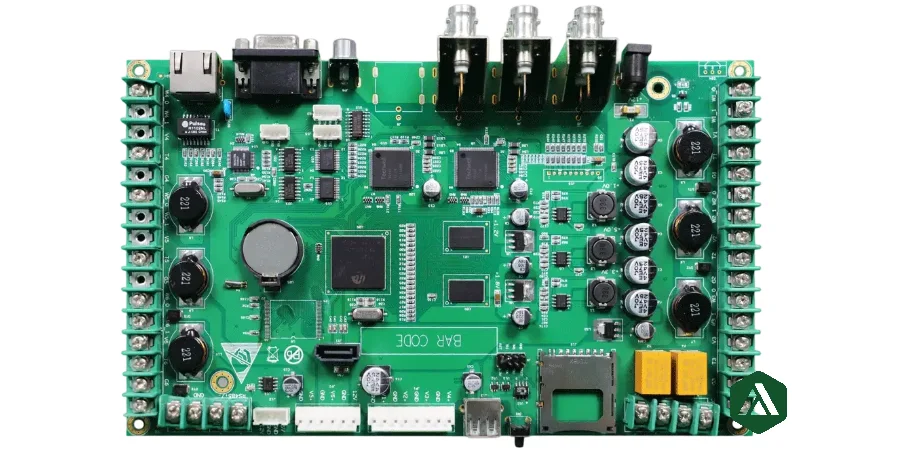
A PCBA bill of materials (BOM) is the controlled manufacturing record that defines which components are purchased, installed, excluded, substituted, and tracked for a specific product revision.
A production-ready BOM does more than list parts. It connects engineering intent with purchasing decisions, SMT programming, assembly inspection, testing, and long-term supply continuity.
When a supplier receives a clear BOM, the assembly team does not need to interpret missing identities, guess acceptable substitutions, or resolve unclear population states before production.
Key takeaways for PCBA BOM release
- Use manufacturer part number (MPN) as the primary component identity.
- Separate customer/internal part numbers, manufacturer data, and sourcing information.
- Match BOM references with schematic, centroid, assembly drawing, and PCB revision data.
- Define DNP/DNI states explicitly for every non-populated option.
- Control alternates through approved manufacturer lists (AML) or line-level approval rules.
- Review lifecycle, availability, compliance, and traceability requirements before purchase.
- Treat sourcing information as a changing production input, not a permanent design assumption.
What fields should a production PCBA BOM include?
A clean assembly BOM should allow engineering, purchasing, and manufacturing teams to answer three questions:
- What exact component is required?
- Where and how is it assembled?
- Who controls substitutions and sourcing decisions?
| Field | Purpose |
|---|---|
| Item/line number | Stable reference during review and ECO changes |
| Quantity per assembly | Confirms purchase quantity and placement count |
| Reference designators | Links BOM items to schematic and placement files |
| Customer/internal part number | Maintains ERP and product configuration identity |
| Manufacturer | Defines approved component source |
| Manufacturer part number | Defines exact orderable component identity |
| Description/value | Provides human-readable verification |
| Package/footprint | Confirms PCB land pattern compatibility |
| Population status | Defines Populate, DNP/DNI, or variant condition |
| Approved alternates | Controls substitute components |
| Procurement owner | Defines turnkey, consigned, or customer-supplied ownership |
| Notes | Records programming, handling, compliance, or traceability requirements |
Distributor SKU information may support purchasing, but it should not replace manufacturer identity. Distributor availability changes frequently while product qualification is tied to the approved component.
How should engineers control PCBA alternates and substitutions?
A BOM note such as “equivalent allowed” does not provide enough engineering control.
The supplier needs to know whether a component is:
- exact MPN required,
- selected from an approved alternate list,
- allowed for supplier proposal with engineering approval.
A substitute that fits the package may still change electrical performance, reliability, firmware behavior, thermal behavior, EMC results, or regulatory compliance.
Component alternate approval matrix
| Part class | Parameters requiring alternate review |
|---|---|
| MLCC | Dielectric, voltage rating, DC bias behavior, tolerance, termination, case size |
| Inductor/transformer | Inductance, saturation current, DCR, core characteristics, footprint |
| MOSFET/diode | Voltage/current rating, RDS(on), forward voltage, switching characteristics, thermal package |
| Regulator/driver | Pin compatibility, control behavior, compensation network, protection features |
| Connector | Mating interface, keying, plating, current rating, mechanical drawing |
| Crystal/oscillator | Frequency, load capacitance, stability, ESR, drive capability, package |
| Safety component | Certification scope, approval standard, voltage rating, construction |
Components connected to firmware, calibration, RF performance, safety certification, or mechanical interfaces normally require explicit engineering approval before substitution.
What is the difference between AML and AVL in a PCBA BOM?
AML and AVL solve different problems.
Approved Manufacturer List (AML) defines which manufacturers and part numbers engineering accepts.
Approved Vendor List (AVL) defines which suppliers or distributors are authorized for purchasing.
A typical controlled sourcing structure separates:
| Data element | Ownership |
|---|---|
| Design intent | Engineering |
| Approved MPNs | Engineering quality approval |
| Supplier source | Purchasing |
| Lot/date traceability | Manufacturing quality |
| Incoming inspection requirements | Quality team |
This separation prevents purchasing availability decisions from silently changing qualified design requirements.
How should DNP, DNI, and product variants be managed?
DNP and DNI components should remain visible in the BOM when they represent:
- product options,
- debugging locations,
- future revisions,
- configuration differences.
Do not communicate population state through:
- spreadsheet colors,
- hidden rows,
- comments,
- informal email instructions.
Use dedicated fields.
| Condition | Required BOM control |
|---|---|
| Optional resistor/capacitor population | Explicit DNP/DNI status |
| Multiple product versions | Variant identifier or controlled stuffing matrix |
| Debug components | Population rule and test ownership |
| No-load locations | Reference designator and assembly instruction |
| Firmware-dependent option | Matching software/configuration revision |
The BOM revision must reconcile with:
- schematic revision,
- PCB fabrication files,
- centroid/pick-and-place data,
- assembly drawing,
- test procedure,
- firmware/programming package.
What PCBA BOM issues delay RFQ and production?
| BOM problem | Manufacturing impact | Resolution |
|---|---|---|
| Missing manufacturer part number | Supplier cannot verify exact component | Add complete MPN and manufacturer |
| Generic component description only | Incorrect sourcing assumptions | Define electrical and mechanical requirements |
| Designator mismatch | BOM and placement data disagree | Export from the same design revision |
| Ambiguous DNP status | Incorrect population during assembly | Add controlled population fields |
| Footprint conflict | Component may not fit PCB land pattern | Review CAD footprint and MPN package |
| Unapproved substitute | Performance or compliance risk | Define alternate approval authority |
| Missing programming data | Functional test cannot complete | Release firmware, checksum, and procedure |
What should be checked before sending a BOM for PCBA quotation?
A supplier-ready RFQ package should include:
- Native BOM spreadsheet or CSV format
- One controlled header row without merged cells
- Exact manufacturer and MPN information
- Reference designators and quantities
- Package and footprint information
- DNP/DNI and variant definitions
- Approved alternates or substitution restrictions
- Customer-supplied component ownership
- Compliance requirements
- Traceability and date/lot requirements
- Firmware, programming, labeling, and serialization requirements
- Matching PCB, centroid, assembly drawing, and test revisions
Use turnkey PCB assembly and submit the package through the PCB quotation page.
PCBA BOM release decision checklist
Before release, confirm each BOM line can pass these checks:
| Review item | Release evidence |
|---|---|
| Part identity | Manufacturer and exact MPN confirmed |
| Placement | Designators match centroid and assembly files |
| Package | Footprint matches PCB design |
| Population | Populate/DNP/variant state defined |
| Alternates | AML or approval rule documented |
| Lifecycle | Active supply status reviewed |
| Compliance | RoHS, REACH, safety, and customer requirements identified |
| Traceability | Lot/date/source requirements defined |
| Test dependency | Programming and functional requirements released |
A BOM is ready for production when the supplier can quote, purchase, assemble, and inspect the intended product without interpretation.
Standards and references
- IPC-2581 — Generic requirements for printed board assembly products manufacturing description data
- IEC 62402 — Obsolescence management
- IPC J-STD-001 — Requirements for soldered electrical and electronic assemblies
- IPC-A-610 — Acceptability of electronic assemblies
- Customer quality agreement and approved manufacturer/vendor list
Confirm current revisions and customer-specific data formats.
Assembly BOM FAQ
Is a distributor part number enough for a PCBA BOM?
Usually not. Manufacturer and manufacturer part number define the qualified component identity. Distributor SKU information can be added as a sourcing reference.
Should DNP parts remain in the BOM?
Yes. DNP components should remain visible when they support variants, debugging, or future options. Their population status must be explicitly controlled.
Can suppliers choose equivalent components?
Only when the substitution policy allows it. Critical parameters such as voltage rating, dielectric, temperature range, timing, firmware compatibility, and certification requirements must be considered.
Should all alternates be placed in one BOM cell?
For simple projects this can work if the approval status is clear. Complex products should maintain a separate AML structure with approved MPN records.
Which files must match the BOM revision?
The BOM should match PCB fabrication data, schematic information, placement files, assembly drawings, firmware/programming files, and test procedures.