
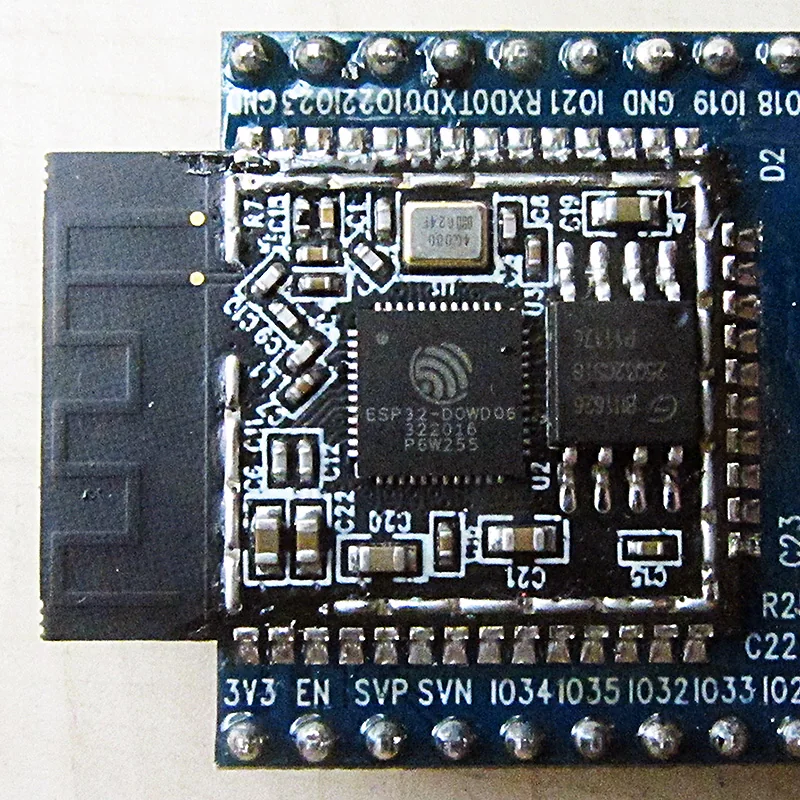
A Bluetooth access control PCB combines BLE communication, credential processing, secure storage, power conversion, sensors, and lock-control electronics into one production system.
The engineering challenge is not only making a Bluetooth connection work. A reliable access-control board must maintain RF performance near metal doors, survive motor or solenoid current events, protect credentials and firmware, and provide measurable production evidence.
Key engineering decisions for a Bluetooth access PCB
| Design area | Main decision | Required production evidence |
|---|---|---|
| BLE radio | Module, SoC, antenna type, RF architecture | RF layout review, antenna data, enclosure validation |
| Power system | Battery, regulator, lock actuator current path | Current profiles, brownout tests, load testing |
| Security | Key storage, provisioning, debug control | Programming records, security-state verification |
| Interfaces | Sensors, readers, tamper, service ports | Functional test coverage |
| Manufacturing | PCB stackup, assembly, inspection strategy | Traceability and acceptance reports |
A successful design connects electrical performance, mechanical integration, firmware security, and manufacturing control.
What does a Bluetooth access control PCB include?
Typical architectures contain:
- BLE radio module or wireless SoC
- Main MCU or application processor
- Secure storage or security hardware
- Battery management and voltage regulation
- Motor, solenoid, strike, or relay drivers
- Door position sensors and tamper inputs
- Credential interfaces such as keypad, NFC, RFID, or external readers
- Programming and service interfaces
The PCB supplier can manufacture and test the released hardware package. Product owners remain responsible for authentication rules, authorization logic, cryptography policy, privacy handling, cloud security, and final certification.
Which BLE antenna should a smart lock PCB use?
The antenna decision depends on enclosure geometry, metal proximity, volume, certification strategy, and tuning access.
| Antenna type | Strength | Design consideration |
|---|---|---|
| BLE module antenna | Faster RF integration | Module placement and enclosure effects still require validation |
| PCB trace antenna | Low component cost | Sensitive to ground plane, board outline, and nearby metal |
| Chip antenna | Compact solution | Requires correct matching and reference layout |
| FPC antenna | Flexible placement | Adds cable and assembly control requirements |
| External antenna | Maximum placement freedom | Connector loss and mechanical protection must be considered |
The antenna, matching network, feed line, ground structure, enclosure, and mounting environment form one RF system.
How should the BLE RF section be laid out?
Bluetooth operates in the 2.4 GHz band, where small layout changes can affect range and reliability.
Key layout requirements include:
- Place the antenna according to the selected vendor reference design.
- Maintain antenna keepout on all required layers.
- Keep the RF feed short and continuous.
- Calculate impedance from the actual PCB stackup.
- Place matching components with access for tuning.
- Separate noisy switching nodes and actuator traces from the RF region.
The antenna PCB guide, high-frequency PCB capability, impedance control page, and PCB stack-up guide provide manufacturing context for these requirements.
A bench pairing test is not enough. Validate RF performance inside the final enclosure because batteries, screws, metal locks, cables, and door materials can change antenna behavior.
How does lock actuator power affect Bluetooth reliability?
Many access-control failures occur when the wireless system shares power resources with a high-current actuator.
Typical disturbance sources include:
- Motor startup current
- Solenoid pulses
- Relay switching
- Battery internal resistance
- Ground bounce
- Inductive energy release
Create power models for:
- Sleep current
- Advertising and connection states
- Credential processing
- Unlock events
- Repeated lock attempts
- Battery replacement
- Fault recovery
Separate actuator current loops from radio and logic returns. Provide appropriate protection paths for inductive loads and verify regulator transient performance under real operating conditions.
What security decisions belong to the PCB?
BLE encryption alone does not define a secure access-control product.
Board-level security decisions include:
| Security item | Engineering decision |
|---|---|
| Credential storage | Internal flash, secure element, protected memory |
| Device identity | Unique provisioning method |
| Firmware | Authentication, update protection, recovery process |
| Debug access | Production lock state for SWD/JTAG/UART |
| Factory process | Operator permissions and traceability |
| Reset behavior | Recovery without exposing credentials |
Production programming becomes part of the security boundary. Device-specific keys, firmware images, and manufacturing records require controlled handling.
How should coexistence and external interfaces be designed?
Access-control products may combine BLE with:
- NFC
- RFID
- Wi-Fi
- Thread
- Zigbee
- Cellular
- Keypads
- Cameras
Review:
- Antenna isolation
- Simultaneous radio operation
- Supply noise
- Cable filtering
- ESD protection
- Shielding strategy
Long door cables and external connectors should be treated as EMC entry paths.
The security equipment PCB page and communication equipment PCB provide broader application context.
How should Bluetooth access PCBA manufacturing be tested?
A production-ready package should define:
- PCB fabrication data, stackup, impedance requirements, and antenna constraints.
- BOM with approved parts, alternates, and lifecycle information.
- Programming process and device provisioning rules.
- Inspection coverage including SPI, AOI, X-ray, ICT, or flying probe where appropriate.
- Functional testing for BLE operation, sensors, outputs, and power behavior.
Use testing and quality control and functional circuit testing to align manufacturing coverage with product requirements.
Bluetooth access PCB failure-mode matrix
| Symptom | Likely cause | Validation |
|---|---|---|
| Short BLE range | Antenna detuning, enclosure interference, RF layout issue | Enclosure RF test, RSSI measurement |
| Disconnect during unlock | Voltage drop, actuator noise, reset event | Current and rail waveform capture |
| Poor battery life | Excess retries, leakage, inefficient power states | Full operating-cycle measurement |
| Factory security concern | Uncontrolled debug or provisioning | Production-state security audit |
| Works open-air but fails installed | Mechanical RF environment change | Final enclosure validation |
Bluetooth access PCB supplier RFQ checklist
Include:
RF requirements
- BLE module or SoC selection
- Antenna type and reference design
- PCB stackup and impedance requirements
- Keepout definition
- RF validation plan
Power requirements
- Battery type and voltage range
- Peak actuator current
- Sleep and active current targets
- Brownout behavior
- Charging requirements
Security requirements
- Firmware image handling
- Device provisioning method
- Debug interface policy
- Key management process
- Traceability requirements
Manufacturing requirements
- PCB files
- BOM
- Assembly drawings
- Test procedures
- Programming instructions
- Inspection requirements
- Quality records
Standards and qualification boundary
Potential references include:
- Bluetooth Core Specification
- Bluetooth qualification requirements
- FCC 47 CFR Part 15
- ETSI EN 300 328
- Radio Equipment Directive 2014/53/EU
- UL 294
- IEC 60839-11-1
- IEC 62368-1
- IEC 61000-4 series
- IPC-2221
- IPC-6012
- IPC-A-610
- J-STD-001
PCB manufacturing and board testing do not automatically establish Bluetooth qualification, cybersecurity approval, access-control certification, or regulatory compliance.
Bluetooth Access Control PCB FAQ
Is a BLE module always better than a custom SoC?
A module can reduce RF development effort, while a custom SoC can improve cost and flexibility at volume. The correct choice depends on production scale, certification needs, and engineering capability.
Can close-range Bluetooth pairing prove RF quality?
No. RF validation requires the final enclosure, installation environment, supply conditions, and representative operating scenarios.
Why does unlocking cause Bluetooth failures?
The actuator can create voltage drops, electromagnetic interference, or resets. Power and communication behavior must be measured during actual lock operation.
Is Bluetooth security enough for a smart lock?
No. Secure access requires controlled provisioning, firmware protection, credential management, debug control, and recovery design.
Request a Bluetooth access PCB/PCBA review
Provide the PCB files, antenna information, enclosure constraints, power profile, lock loads, security requirements, test plan, and production quantities.