
The electronics manufacturing landscape has shifted from manual oversight to data-driven automation. A Digital Factory PCB represents this evolution. It refers to printed circuit boards manufactured within a fully interconnected, smart manufacturing environment (Industry 4.0), or boards specifically designed to enable industrial digitization.
For engineers and procurement managers, understanding this shift is critical. It moves the focus from simple fabrication to comprehensive traceability, real-time quality monitoring, and predictive maintenance. This guide covers the entire lifecycle of a Digital Factory PCB, from the initial data definition to final validation.
Key Takeaways
- Definition: A Digital Factory PCB utilizes interconnected systems (MES/ERP) to automate production data, ensuring higher precision and repeatability than traditional methods.
- Traceability: Every board has a digital twin. You can trace raw materials, machine settings, and operator actions for every specific unit.
- Metric Focus: First Pass Yield (FPY) and Overall Equipment Effectiveness (OEE) are the primary indicators of a successful digital production line.
- Misconception: Many believe digital manufacturing is only for high volume. In reality, it significantly reduces setup times for High-Mix Low-Volume (HMLV) projects.
- Tip: Use intelligent data formats like ODB++ or IPC-2581 instead of basic Gerbers to fully leverage digital factory capabilities.
- Validation: Automated Optical Inspection (AOI) and Solder Paste Inspection (SPI) data should be linked directly to the board's serial number.
What Digital Factory PCB really means (scope & boundaries)
Building on the key takeaways, it is essential to define the scope of this technology to avoid confusion with standard fabrication.
A Digital Factory PCB is defined by the integration of the physical manufacturing process with digital data streams. In a traditional setup, machines operate in silos. In a digital factory, the solder paste printer talks to the pick-and-place machine, which talks to the reflow oven. This is often referred to as a Connected Factory PCB environment.
The scope includes:
- Data-Driven Fabrication: The use of CAM engineering software that automatically generates machine instructions, reducing human error.
- Real-Time Monitoring: Sensors track temperature, humidity, and machine vibration during production. If a parameter drifts, the line adjusts automatically.
- End-to-End Traceability: A QR code or laser marking on the PCB links to a database containing the entire history of that board.
- Smart Logistics: Automated Guided Vehicles (AGVs) and smart warehousing ensure materials are delivered exactly when needed (JIT).
The boundaries: It does not necessarily mean the PCB itself is "smart" (though it can be). It refers to the method of manufacturing. However, the term is also used to describe PCBs designed for digital factories—such as boards controlling robotic arms or industrial IoT sensors.
Digital Factory PCB metrics that matter (how to evaluate quality)
Once you understand the scope of a digital factory, you must know how to measure its performance.
In a Digital Factory PCB environment, metrics go beyond simple "pass/fail." They analyze the stability of the process. When selecting a manufacturer like APTPCB (APTPCB PCB Factory), ask about these specific metrics to gauge their digital maturity.
| Metric | Why it matters | Typical range or influencing factors | How to measure |
|---|---|---|---|
| First Pass Yield (FPY) | Indicates process stability. High FPY means fewer rework cycles and better long-term reliability. | 95% - 99.5% (varies by complexity). | (Units passing first test / Total units entered) × 100. |
| Traceability Depth | Critical for liability and root-cause analysis in automotive or medical sectors. | Component level vs. Batch level. | Audit a random serial number: can you find the solder paste batch ID? |
| OEE (Overall Equipment Effectiveness) | Measures how effectively manufacturing equipment is utilized. | World-class is >85%. | Availability × Performance × Quality. |
| Cpk (Process Capability Index) | Predicts the ability of a process to stay within specification limits. | >1.33 is standard; >1.67 is excellent. | Statistical analysis of critical dimensions (e.g., impedance, hole size). |
| DPMO (Defects Per Million Opportunities) | A standard metric for high-volume quality comparison. | <50 for high-reliability class 3 electronics. | (Total Defects / (Total Units × Opportunities per Unit)) × 1,000,000. |
| Data Loopback Time | Speed at which test data feeds back to the start of the line to correct errors. | Real-time to <1 hour. | Time difference between defect detection and process parameter adjustment. |
How to choose Digital Factory PCB: selection guidance by scenario (trade-offs)
Metrics provide the data, but the right choice depends on your specific project constraints.
Not every project requires the full overhead of a fully automated digital line. Below are scenarios illustrating how to choose the right Digital Factory PCB approach, balancing cost, speed, and quality.
1. Scenario: High-Mix Low-Volume (HMLV)
- Context: Industrial controllers, specialized medical devices.
- Trade-off: High setup frequency vs. efficiency.
- Guidance: Choose a digital factory with automated changeover capabilities. The ability to switch job files instantly without manual recalibration is key.
- Verdict: Prioritize software integration over raw line speed.
2. Scenario: Mass Production (Consumer Electronics)
- Context: Smart home devices, wearables.
- Trade-off: Unit cost vs. traceability.
- Guidance: Focus on mass production PCB manufacturing capabilities where automation drives down labor costs.
- Verdict: High-speed pick-and-place and automated optical inspection (AOI) are non-negotiable.
3. Scenario: High-Reliability (Automotive/Aerospace)
- Context: ECU units, flight control systems.
- Trade-off: Documentation cost vs. risk mitigation.
- Guidance: Traceability is the primary driver. You need a "Connected Factory PCB" setup where every component placement is logged.
- Verdict: Select vendors compliant with IATF 16949 and full MES integration.
4. Scenario: Rapid Prototyping
- Context: Proof of concept, R&D.
- Trade-off: Speed vs. process maturity.
- Guidance: While 3D Printing PCB technology is emerging for prototypes, a digital factory with a dedicated "Quick Turn" lane using standard processes offers better production relevance.
- Verdict: Use digital quoting tools for instant feedback, but standard fabrication for electrical validity.
5. Scenario: Complex HDI Designs
- Context: Smartphones, high-performance computing.
- Trade-off: Yield vs. density.
- Guidance: Requires HDI PCB capabilities with laser direct imaging (LDI). Digital alignment is crucial for microvias.
- Verdict: Manual alignment is impossible here; fully digital imaging is required.
6. Scenario: Legacy Industrial Replacement
- Context: Replacing boards for machines built 20 years ago.
- Trade-off: Reverse engineering vs. new data generation.
- Guidance: The challenge is digitizing old films or drawings.
- Verdict: Choose a partner with strong CAM engineering support to convert analog data into digital production files.
Digital Factory PCB implementation checkpoints (design to manufacturing)
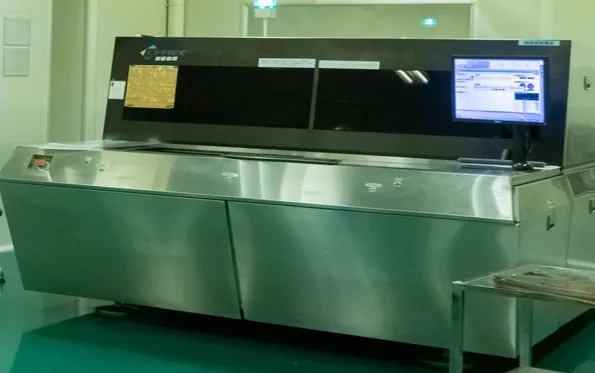
After selecting the right scenario, you must ensure your design data is ready for a digital manufacturing environment.
A Digital Factory PCB relies on clean, structured data. Ambiguity in the design file stops the automation. Follow these checkpoints to ensure a smooth transition from design to production.
1. Data Format Selection
- Recommendation: Use ODB++ or IPC-2581.
- Risk: Gerber files separate geometry from netlist data, increasing the risk of misinterpretation during CAM review.
- Acceptance: Manufacturer confirms file import with zero conversion errors.
2. Stackup Definition
- Recommendation: Define dielectric materials and copper weights explicitly in the digital file, not just in a text note.
- Risk: Automated impedance calculators may use default values if specific materials aren't tagged.
- Acceptance: PCB Stack-up approval sheet matches simulation results.
3. Fiducial Marker Placement
- Recommendation: Place global fiducials on the panel rails and local fiducials near fine-pitch components.
- Risk: Automated vision systems cannot align the board accurately without high-contrast fiducials.
- Acceptance: Vision system recognizes alignment points in <1 second.
4. Panelization Strategy
- Recommendation: Allow the factory to define the panel array for maximum material utilization, or strictly define it if you have specific assembly fixtures.
- Risk: Poor panelization leads to waste and handling issues in automated loaders.
- Acceptance: Panel drawing includes tooling holes and breakaway tabs compatible with the assembly line.
5. Component Footprint Validation
- Recommendation: Ensure CAD footprints match the physical component leads (IPC-7351 standards).
- Risk: "Tombstoning" or solder bridges during reflow.
- Acceptance: Design for Assembly (DFA) review passes with no critical alerts.
6. Test Point Accessibility
- Recommendation: Place test points on a single side where possible to simplify fixture design or Flying Probe testing.
- Risk: Lack of access prevents automated electrical testing (ICT/FCT).
- Acceptance: 100% net coverage in test program generation.
7. Unique Identification (UID)
- Recommendation: Reserve space on the silkscreen or copper for a laser-etched QR code or barcode.
- Risk: Loss of traceability once the board leaves the factory.
- Acceptance: Barcode is readable by standard handheld scanners.
8. Surface Finish Selection
- Recommendation: Choose finishes compatible with your assembly method (e.g., ENIG for flat surfaces on fine-pitch BGAs).
- Risk: HASL unevenness causes placement errors for small components.
- Acceptance: Surface finish thickness measurement report meets IPC specifications.
9. Thermal Profiling Data
- Recommendation: Provide component thermal limits to help the factory set reflow oven profiles.
- Risk: Overheating sensitive components during automated soldering.
- Acceptance: First article passes functionality test without heat damage.
10. Digital Bill of Materials (BOM)
- Recommendation: BOM must include Manufacturer Part Numbers (MPN), not just descriptions.
- Risk: Automated sourcing systems buy the wrong part based on a generic description like "10k Resistor."
- Acceptance: BOM scrubbing tool returns 100% match on MPNs.
Digital Factory PCB common mistakes (and the correct approach)
Even with a checklist, errors can occur if the mindset doesn't shift to digital-first.
Here are the most common pitfalls engineers encounter when interfacing with a Digital Factory PCB provider, and how to avoid them.
"Over-the-wall" Engineering:
- Mistake: Sending files and waiting for boards without a DFM (Design for Manufacturing) review.
- Correction: Engage in a collaborative DFM review before the final file release. Digital factories often have automated DFM tools you can use.
Ignoring Data Hygiene:
- Mistake: Leaving unused layers, stray text, or zero-width lines in the design file.
- Correction: Clean up the CAD data. Automated CAM systems may interpret stray lines as copper features, causing shorts.
Tight Tolerances Everywhere:
- Mistake: Applying ±0.05mm tolerance to non-critical features.
- Correction: Only apply tight tolerances where necessary (e.g., connectors, impedance lines). This reduces cost and false failures in automated inspection.
Neglecting the Z-Axis:
- Mistake: Focusing only on X-Y dimensions and ignoring component height or PCB thickness variations.
- Correction: Verify that the total assembly height fits the enclosure and that the PCB thickness is standard (e.g., 1.6mm) unless required otherwise.
Hard-Coding Text in Copper:
- Mistake: Placing text in copper layers that violates minimum spacing rules.
- Correction: Use silkscreen for text. If copper text is needed, ensure it adheres to the manufacturer's minimum line width/spacing rules.
Assuming "Standard" Means the Same Everywhere:
- Mistake: Assuming "Green Solder Mask" is the same shade or chemical composition across all vendors.
- Correction: Specify the IPC standard or specific ink type if consistency is critical for optical sensors or aesthetics.
Forgetting the Pick-and-Place File:
- Mistake: Sending Gerbers but forgetting the Centroid (Pick and Place) file.
- Correction: The assembly machines cannot run without coordinate data. Always include the XY coordinate file.
Digital Factory PCB FAQ (cost, lead time, materials, testing, acceptance criteria)
Addressing specific questions helps clarify the practicalities of ordering.
1. How does Digital Factory PCB manufacturing impact cost? Initially, the NRE (Non-Recurring Engineering) cost might be slightly higher due to rigorous data setup. However, for production runs, the cost is lower due to reduced scrap rates, higher yields, and automated efficiency.
2. What is the typical lead time for a Digital Factory PCB? Digital integration speeds up the front-end engineering (CAM) process. Standard prototypes can often be turned around in 24-48 hours, while mass production lead times are reduced because real-time scheduling optimizes machine uptime.
3. Can I use standard materials like FR4 in a digital factory? Yes. Digital factory refers to the process, not the material. You can process standard FR4, High TG PCB materials, or specialized RF substrates using digital manufacturing lines.
4. How does testing differ in a digital factory environment? Testing is integrated. Instead of a standalone tester printing a paper ticket, the ICT or Flying Probe tester uploads results to the cloud. If a board fails, the system automatically locks it from moving to the shipping department.
5. What are the acceptance criteria for Digital Factory PCBs? Acceptance is usually based on IPC-A-600 (for bare boards) and IPC-A-610 (for assemblies). In a digital factory, you can also request a "Certificate of Conformance" (CoC) that includes digital logs of the test results.
6. Is 3D Printing PCB the same as Digital Factory PCB? No. 3D Printing PCB usually refers to additive manufacturing (printing conductive ink on a substrate). Digital Factory PCB typically refers to subtractive manufacturing (etching) done with smart, connected equipment. 3D printing is great for rapid prototyping but lacks the durability for most volume production.
7. How do I specify impedance control in a digital workflow? Do not rely on email notes. Include the impedance requirements directly in the ODB++ file or the stackup layer of your Gerber data. This allows the CAM software to automatically flag violations.
8. Does APTPCB support API integration for ordering? Many digital factories, including APTPCB, offer portals or API connections that allow you to upload designs, get quotes, and track order status in real-time, streamlining the procurement process.
9. What happens if the digital data doesn't match the fabrication notes? The digital factory system will flag a "Data Hold." The engineering team will pause the job and contact you for clarification. This prevents the costly mistake of manufacturing the wrong board.
10. Can digital factories handle flexible circuits? Yes. Flex PCB manufacturing benefits greatly from digital cutting and laser drilling, which offer higher precision than traditional mechanical dies.
Resources for Digital Factory PCB (related pages and tools)
To further assist in your design and procurement process, utilize these resources.
- Design Validation: Use the DFM Guidelines to prepare your files before submission.
- Visual Check: Verify your files using an online Gerber Viewer to see exactly what the factory sees.
- Material Selection: Explore PCB Materials to choose the right substrate for your digital application.
Digital Factory PCB glossary (key terms)
A quick reference for the terminology used in smart manufacturing.
| Term | Definition |
|---|---|
| MES (Manufacturing Execution System) | Software that monitors and controls the manufacturing process on the factory floor. |
| ERP (Enterprise Resource Planning) | Integrated management of main business processes, often linked to MES for inventory and billing. |
| Digital Twin | A virtual replica of the physical PCB used for simulation and tracking throughout its lifecycle. |
| Gerber Format | The traditional standard file format for PCB fabrication data (2D vector images). |
| ODB++ | An intelligent data format that includes geometry, netlist, and stackup data in a single file structure. |
| IPC-2581 | An open standard XML-based format for exchanging PCB design and manufacturing data. |
| AOI (Automated Optical Inspection) | A system using cameras to scan PCBs for catastrophic failures and quality defects. |
| SPI (Solder Paste Inspection) | Inspection of solder paste deposition volume and alignment before component placement. |
| LDI (Laser Direct Imaging) | A method of patterning circuit traces directly from digital data without using photo films. |
| Fiducial Mark | A reference point on the PCB used by automated machines for optical alignment. |
| IoT (Internet of Things) | The network of physical objects (machines) embedded with sensors to exchange data. |
| Smart Factory | A highly digitized and connected production facility that relies on smart manufacturing. |
| Traceability | The ability to verify the history, location, or application of an item by means of documented recorded identification. |
Conclusion (next steps)
The transition to Digital Factory PCB manufacturing is not just about upgrading machinery; it is about upgrading the reliability and transparency of your supply chain. By leveraging data-driven processes, you gain better yields, faster feedback loops, and total traceability.
Whether you are designing a complex HDI board or a simple sensor, the principles of the digital factory ensure that what you design is exactly what you get.
Ready to start your next project? To ensure a smooth quote and production process with APTPCB, please prepare the following:
- Digital Data: ODB++ or RS-274X Gerbers.
- Stackup: Defined dielectric thicknesses and copper weights.
- BOM: Complete Bill of Materials with MPNs (for assembly).
- Test Requirements: Specifics for ICT, FCT, or impedance testing.
Embrace the precision of digital manufacturing to bring your electronic innovations to life with confidence.