
What is an Eye Generator PCB and why does signal integrity matter?
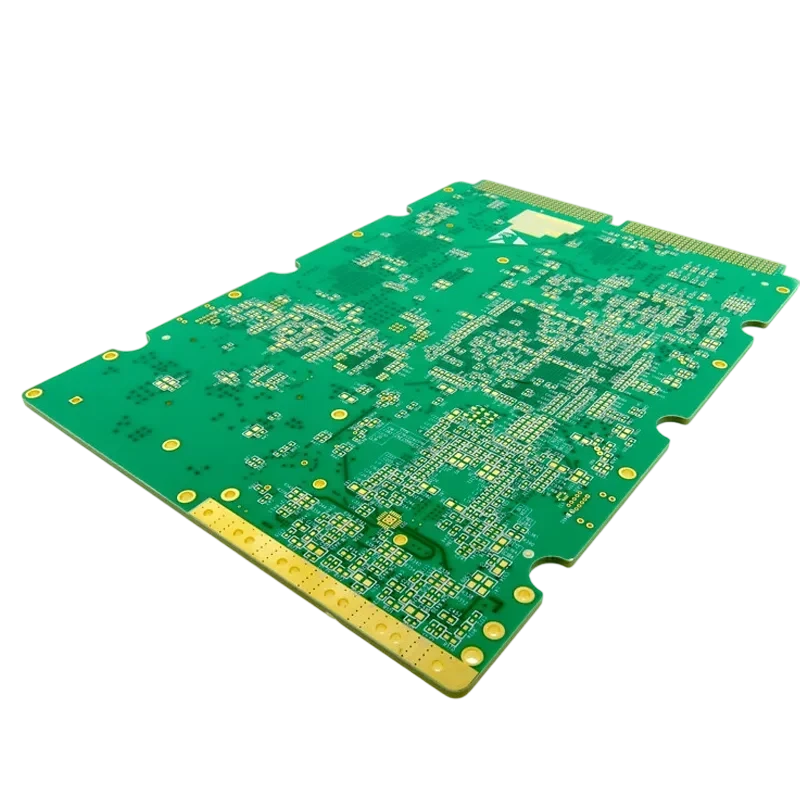
An Eye Generator PCB is a specialized high-speed circuit board designed to create repeatable digital patterns or precision waveforms for signal-integrity testing. In practice it is a type of eye diagram test board PCB: the generator, fixture, or reference board whose own channel must be clean enough that the eye you measure reflects the device under test, not the board. These boards are used in BER testers, receiver validation platforms, compliance fixtures, clock analysis systems, and reference transmitters.
Unlike ordinary digital PCBs, an Eye Generator PCB is itself part of the measurement chain. Any loss, impedance variation, connector discontinuity, or power noise introduced by the board changes the eye diagram that engineers use to judge system performance.
A successful design maintains:
- Low insertion loss through controlled materials.
- Stable 50Ω single-ended or 100Ω differential impedance.
- Low deterministic and random jitter.
- Clean power delivery for timing-critical circuits.
- Repeatable manufacturing tolerances.
For high-speed serial links such as PCIe Gen 4/5/6, USB4, and 100G/400G Ethernet validation, the PCB is not simply a carrier. It is a precision transmission structure.
When should you use an Eye Generator PCB design approach?
The correct PCB strategy depends on the purpose of the board.
| Application | Main requirement | PCB priority |
|---|---|---|
| BER Generator PCB | Clean PRBS or custom pattern output | Low loss, impedance accuracy, connector quality |
| Clock Generator PCB | Low phase noise and timing stability | Power integrity, oscillator isolation, thermal control |
| DDS Generator PCB | Accurate waveform reconstruction | Analog routing, filtering, grounding |
| Analog Generator PCB | Low distortion output | Noise control and signal purity |
| Reference transmitter | Repeatable compliance testing | Production consistency and traceability |
An Eye Generator PCB approach is usually unnecessary for:
- Low-frequency control boards.
- Simple audio generator circuits.
- Non-signal mechanical fixtures.
- Power-only boards without high-speed switching paths.
How do you select materials for an Eye Generator PCB?
Material selection determines how much signal energy survives at the target frequency.
For lower-speed designs, high-performance FR-4 materials may provide sufficient margin. At higher data rates, low-loss laminates reduce attenuation and preserve eye opening.
Typical choices include:
- Rogers 4350B for controlled high-frequency performance.
- Panasonic Megtron 6/7 for advanced serial links.
- Tachyon 100G-class materials for very high-speed channels.
Rogers, Panasonic, and Isola each cover several of these tiers. For the Isola side, including the Tachyon and I-Tera families, see the Isola laminate group page; for very short, lower-rate fixtures, a high-performance FR-4 may still close the budget.
Important material parameters include:
| Parameter | Typical target | Impact on eye quality |
|---|---|---|
| Dissipation factor (Df) | <0.004 at 10 GHz for demanding links | Lower loss preserves vertical eye opening |
| Copper profile | VLP or HVLP | Reduces conductor loss at high frequency |
| Dk stability | Controlled across frequency and temperature | Prevents timing drift |
| Glass weave | Spread glass where required | Reduces differential skew |
The correct laminate depends on the complete channel budget, including trace length, connector loss, package loss, and receiver equalization capability.
What impedance specifications should an Eye Generator PCB meet?
Controlled impedance is one of the most important manufacturing requirements.
Common targets are:
- 50Ω single-ended transmission lines.
- 100Ω differential pairs.
- ±5% impedance tolerance for many high-speed applications.
A controlled impedance PCB requires coordination between:
- Layer stackup.
- Dielectric thickness.
- Copper thickness.
- Trace width.
- Trace spacing.
- Material Dk.
A calculator value alone is not enough. The fabrication process determines the final impedance, so every production design should include impedance coupons and TDR verification.
Eye Generator PCB manufacturing decision matrix
| Design decision | Option A | Option B | Selection factor |
|---|---|---|---|
| PCB material | High-performance FR-4 | Low-loss laminate | Data rate and loss budget |
| Via structure | Through via | Backdrilled/blind via | Frequency and stub sensitivity |
| Connector | Through-hole SMA/BNC | Edge-launch high-frequency connector | Signal bandwidth |
| Surface finish | HASL | ENIG/Immersion Silver | Flatness and high-frequency consistency |
| Fabrication class | IPC Class 2 | IPC Class 3 | Reliability requirement |
| Routing reference | Mixed planes | Continuous ground reference | Return current control |
How should an Eye Generator PCB stackup be designed?
A high-speed generator board requires a stackup that supports predictable electromagnetic behavior.
Recommended practices include:
- Place high-speed signal layers adjacent to solid reference planes.
- Maintain short return-current paths.
- Separate noisy power sections from timing-critical circuits.
- Use sufficient ground layers for shielding and impedance stability.
A typical high-speed board may use:
- 8 to 20+ layers.
- Signal-ground-signal-ground structures.
- Dedicated power and ground planes.
The stackup should be finalized before routing begins because changing dielectric thickness later can invalidate impedance calculations.
What layout techniques keep the eye open?
High-speed routing decisions directly affect jitter, insertion loss, and reflections.
Key implementation points:
- Place FPGA, ASIC, DDS, or pattern-generator ICs close to output connectors.
- Route differential pairs with matched lengths.
- Keep high-speed traces over continuous reference planes.
- Minimize layer transitions.
- Remove unnecessary via stubs.
- Use smooth bends instead of abrupt routing changes.
- Keep sensitive clocks away from noisy switching signals.
For demanding designs:
- Match differential-pair lengths within approximately 1–2 mils where required by the interface.
- Use backdrilling when via stubs create resonant effects.
- Consider spread-glass materials when fiber-weave skew becomes significant.
Eye Generator PCB failure analysis: what causes a closed eye?
A closed eye diagram usually indicates excessive loss, noise, timing error, or reflection.
| Symptom | Likely PCB cause | Verification method | Corrective action |
|---|---|---|---|
| Reduced eye height | Dielectric loss, copper roughness, long traces | Insertion-loss measurement, material review | Use lower-loss laminate or shorten channel |
| Reduced eye width | Jitter, skew, crosstalk | Oscilloscope jitter analysis | Improve routing symmetry and clock isolation |
| Ringing or overshoot | Impedance discontinuity | TDR measurement | Optimize vias, connectors, and trace transitions |
| Bit errors at high speed | Loss budget exceeded | BER testing | Improve stackup and equalization |
| Temperature-related drift | Material or oscillator instability | Thermal chamber test | Select stable materials and improve thermal design |
What files should be included in an Eye Generator PCB RFQ?
A complete manufacturing package reduces redesign cycles.
Provide:
- Gerber RS-274X or ODB++ files.
- NC drill files.
- Fabrication drawing.
- Layer stackup requirements.
- Controlled impedance requirements.
- Material specification.
- Backdrill requirements.
- Assembly drawings.
- Netlist for verification.
For production-level test equipment, include acceptance requirements such as:
- TDR impedance results.
- Microsection requirements.
- Surface-finish specifications.
- IPC-A-610 assembly class.
How is an Eye Generator PCB validated after fabrication?
Validation should combine electrical measurement and manufacturing inspection.
Typical validation methods include:
TDR testing
Time Domain Reflectometry verifies:
- Actual impedance.
- Connector transitions.
- Via discontinuities.
VNA testing
A Vector Network Analyzer measures:
- Insertion loss.
- Return loss.
- Frequency response.
Eye diagram measurement
The final eye measurement evaluates:
- Eye height.
- Eye width.
- Jitter.
- BER margin.
Manufacturing inspection
Additional checks include:
- AOI inspection.
- X-ray inspection for fine-pitch components.
- Cross-section analysis.
- Surface-finish verification.
Eye Generator PCB supplier checklist
Before selecting a PCB manufacturer, confirm:
| Supplier capability | Why it matters |
|---|---|
| Controlled impedance fabrication | Ensures transmission-line accuracy |
| Low-loss laminate experience | Required for high-speed channels |
| Backdrilling capability | Removes high-frequency via stubs |
| TDR testing | Confirms impedance targets |
| High-frequency assembly | Protects connector and component transitions |
| Stackup engineering support | Prevents manufacturability issues |
Eye Generator PCB FAQ
Can standard FR-4 be used for a 10 Gbps Eye Generator PCB?
It depends on channel length and loss budget. Standard FR-4 may work for very short traces, but low-loss materials are typically preferred for long channels or precision test equipment.
How much does backdrilling increase PCB cost?
Backdrilling commonly increases bare-board cost because it adds drilling operations and verification steps. The exact impact depends on layer count and volume.
Which connector type is best for high-speed generator boards?
Edge-launch connectors are commonly selected for high-frequency applications because they provide a controlled transition from connector pin to PCB transmission line.
Do Eye Generator PCBs need ENIG plating?
ENIG is widely used because it provides a flat surface suitable for fine-pitch assembly. Hard gold is generally reserved for repeated-contact edge fingers.
What causes jitter in a Clock Generator PCB?
Jitter may result from clock-source noise, power supply variation, crosstalk, impedance discontinuities, and poor grounding.
Resources for Eye Generator PCB design
- High speed PCB manufacturing: Detailed capabilities for boards running 25Gbps+.
- PCB impedance calculator: Estimate trace width and spacing for your stackup.
- Rogers PCB Materials: Specifications for low-loss laminates essential for eye generators.
- PCBA testing services: How assembled boards are validated using AOI, X-Ray, and functional testing.
Eye Generator PCB glossary
| Term | Definition |
|---|---|
| Eye Diagram | A repeated display of digital transitions showing signal quality and timing margin. |
| Jitter | Timing variation from ideal signal transitions. |
| ISI | Distortion caused when previous symbols affect later symbols. |
| BER | Bit Error Rate measurement used for communication reliability. |
| Backdrilling | Removing unused via barrel length to reduce reflections. |
| DDS | Direct Digital Synthesis for generating programmable waveforms. |
| Impedance Control | Maintaining a defined transmission-line impedance. |
| Skew | Timing difference between related signals. |
| Insertion Loss | Signal power reduction through a channel. |
| Rise Time | Transition time between logic levels. |
Request a quote for Eye Generator PCB
For high-performance test equipment, precision manufacturing starts with a correct stackup and fabrication plan.
Provide:
- Gerber Files: RS-274X or ODB++ format.
- Fabrication Drawing: Material, layer stackup, and impedance requirements.
- Drill File: Including backdrill locations.
- Quantity and Lead Time: Prototype or production requirements.
Conclusion: designing an Eye Generator PCB for reliable measurements
An Eye Generator PCB must be treated as a precision signal-integrity component. Material choice, impedance control, routing, connector transitions, and fabrication verification all determine whether the final eye diagram remains open.
By matching the PCB architecture to the required data rate, validating manufacturing tolerances with TDR and VNA testing, and selecting a supplier experienced with high-speed boards, engineers can create reliable BER testers, clock generators, DDS platforms, and reference transmitters for modern communication systems.