
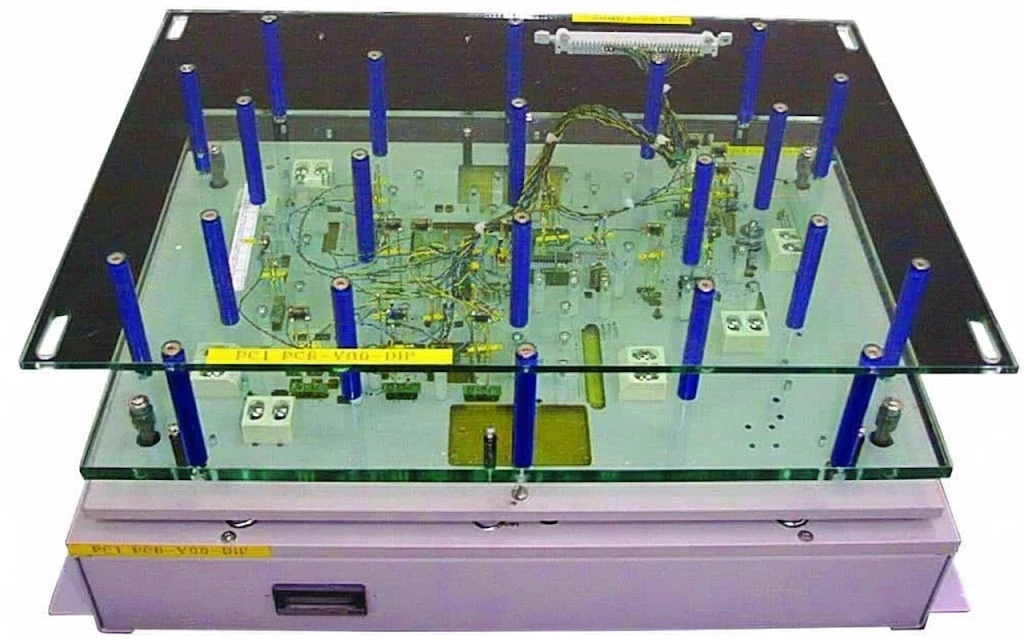
ICT fixture introduction is the controlled transfer of a PCBA design into a dedicated in-circuit test fixture, test program, validated limits, and maintainable production release. It begins with design-for-test (DFT), not with drilling a bed-of-nails plate.
This guide helps design, test, manufacturing, and sourcing teams decide whether a board is ready for fixture-based ICT and define the evidence required before production release.
Key Takeaways
- ICT screens accessible electrical nodes for manufacturing defects; it does not prove complete application-level function.
- Choose ICT, flying probe, functional test, and inspection methods by test objective, design maturity, access, throughput, and defect risk—not by one universal volume threshold.
- Freeze the schematic, BOM, CAD data, revision, tester interface, access list, and acceptance plan before fixture and program release.
- Report access, component, defect, measurement, and functional coverage separately; a single unexplained “coverage percentage” is not actionable.
- Accept the fixture with repeatability, known-good and known-fault evidence, false-call investigation, cycle-time evidence, and controlled release files.
- Maintain probes, wiring, support hardware, reference units, software, and revision history as one test asset.
Contents
- What does ICT verify?
- ICT vs flying probe, FCT, AOI, and X-ray
- Is the PCBA ready for an ICT fixture?
- How should test access be designed?
- What data is required?
- How is an ICT fixture introduced?
- How should ICT coverage be reported?
- How should the fixture be accepted?
- Common ICT fixture failures
- Maintenance and revision control
- ICT fixture RFQ checklist
- FAQ
What does ICT verify?
In-circuit test uses spring probes and a dedicated interface to contact selected points on an assembled board. Depending on the tester, circuit topology, access, and program, it can screen for opens, shorts, missing or incorrect components, polarity errors, and out-of-limit resistance, capacitance, diode, or other electrical conditions. It may also support limited powered measurements or device programming when those functions are explicitly engineered.
ICT does not automatically verify firmware behavior, communications under real loads, timing margins, RF performance, safety compliance, or operation in the end product. Those claims need separate functional circuit testing, system validation, or qualification evidence.
The most useful test strategy assigns each defect class to the earliest capable gate. Paste deposition belongs to SPI; visible placement and solder features belong to AOI; concealed joints may need X-ray; accessible electrical defects belong to ICT or flying probe; powered behavior belongs to FCT.
ICT vs flying probe, FCT, AOI, and X-ray
No single method provides complete PCBA coverage. Select the combination that closes the important defect risks with the least duplicated effort.
| Method | Primary evidence | Main constraint | Typical decision trigger |
|---|---|---|---|
| ICT | Parallel, fixture-based electrical screening at accessible nodes | Dedicated fixture, stable revision, physical access | Repeated production where contact-based screening and predictable cycle time justify tooling |
| Flying probe | Fixture-free electrical probing | Sequential probing and tester accessibility | Prototypes, changing revisions, lower repetition, or layouts not ready for fixed tooling |
| FCT | Powered interfaces, states, loads, and intended behavior | Product-specific hardware, firmware, limits, and safe power control | Functional behavior must be demonstrated after assembly screening |
| AOI | Visible placement, polarity, presence, and solder-feature evidence | Cannot see every concealed joint or prove electrical behavior | Broad visual inspection before electrical test |
| X-ray | Internal or concealed-joint images | Interpretation, sampling strategy, and limited electrical insight | BGA, QFN, bottom-terminated, or other hidden-joint risks |
Use flying probe testing when fixture commitment is premature. Use the broader PCBA testing and quality flow to define how all gates combine. The right answer may be ICT plus FCT, flying probe plus FCT, or inspection plus a product-specific test—not an automatic winner.
Is the PCBA ready for an ICT fixture?
An ICT fixture should enter build only after the board, tester, and test intent pass a readiness gate. A purchase order alone is not a technical release.
| Readiness gate | Ready when | Hold fixture release when | Required evidence |
|---|---|---|---|
| Test objective | Target defects and measurements are assigned to ICT | “Test the board” is the only requirement | Test strategy and defect-to-gate matrix |
| Electrical control | Required nodes can be stimulated, isolated, guarded, or measured as designed | Parallel paths or active devices make the proposed limits unreliable | Schematic review and preliminary program strategy |
| Physical access | Targets, probe side, keep-outs, tooling, and support are agreed | Targets are obstructed, unstable, or split across sides without an approved fixture concept | DFT access report and mechanical overlay |
| Design maturity | One controlled PCB, BOM, and schematic revision is released | Layout, part population, or net naming is still changing | Revision manifest and approved data package |
| Tester compatibility | Tester model, channel resources, interface, and optional programming needs are known | Fixture is being designed without the target platform configuration | Tester/interface specification |
| Acceptance plan | Repeatability, fault detection, reporting, and release owners are defined | Acceptance means only “a golden board passed once” | Written validation protocol |
| Lifecycle ownership | Storage, backups, maintenance, spares, and change control have owners | No one owns the fixture after initial debug | Asset and maintenance plan |
Design maturity is not the same as annual volume. A stable board with strong access and repeated use may suit ICT; a high-quantity board with poor access may require redesign or a different test architecture.
How should test access be designed?
ICT access has two parts: the circuit must be electrically controllable, and the fixture must reach and support the physical targets repeatably. Solving only one part produces fragile coverage.
Electrical access and controllability
- Map every intended measurement to the nodes, guards, grounds, power controls, and isolation conditions it requires.
- Review parallel component paths, protection devices, relays, switches, transformers, large capacitances, and active circuitry that can mask or disturb measurements.
- Define safe discharge, clamp, power-up, and power-down behavior before adding powered tests.
- Identify untestable or partially testable devices early and assign their residual risk to boundary scan, programming verification, FCT, inspection, or another gate.
- Consider IEEE 1149.1 boundary scan where compatible devices and board architecture make it useful; it is not a substitute for missing planning.
Physical targets, tooling, and support
Place dedicated test pads on one side where practical. Single-sided probing generally reduces mechanics, wiring, alignment, and debug complexity. Double-sided or clamshell access can be valid, but it needs an explicit mechanical and cost decision.
Common planning guidance uses approximately 1.0 mm targets where space allows, considers 0.8 mm targets when alignment and process capability are controlled, prefers about 2.5 mm probe pitch, and keeps targets roughly 3.2 mm from the board edge. Two non-plated tooling holes near opposite corners can support repeatable alignment. These are starting points from established DFT practice—not universal acceptance limits. The fixture supplier must approve target size, pitch, keep-outs, probe family, tooling, and tolerances for the actual board and tester.
Do not treat every via as a free test point. Via probing depends on diameter, finish, mask opening, probe tip, positional tolerance, and acceptable witness marks. Broadly untenting vias can create manufacturing or contamination tradeoffs. Agree each via-based target rather than changing the solder-mask policy globally.
Dense probe fields need support close enough to control board deflection without loading components, joints, or sensitive areas. Review tall parts, connectors, shields, heatsinks, labels, coatings, board edges, breakaway rails, and bottom-side components against the fixture envelope. If strain risk is material, define a board-strain validation method and product-specific limits instead of copying a universal microstrain number.
Use the DFM guidelines to start the access review, then obtain a fixture-specific DFT report before layout release.
What data is required?
Fixture fabrication and test-program development require a synchronized, revision-controlled package. The exact format depends on the tester and supplier, but the package normally includes:
- PCB CAD or intelligent manufacturing data accepted by the supplier, such as ODB++ or IPC-2581, plus Gerber and NC drill data where requested
- Schematic with reference designators, net names, power domains, test controls, and circuit notes
- BOM with manufacturer part numbers, values, tolerances, polarity, fitted/DNI status, and approved alternates
- Centroid or placement data and assembly drawings for component location and orientation
- Netlist or test-access data, including IPC-356 where it supports the agreed workflow
- Board outline, tooling holes, thickness, panel or carrier details, keep-outs, and 3D/mechanical information
- Test-point list with coordinates, side, net, target type, intended test, and access status
- Tester model, interface, channel resources, fixture actuation preference, and line constraints
- Programming files, device instructions, security handling, serialization, and verification method when programming is in scope
- Expected production variants, option populations, revision policy, test limits, reports, and traceability requirements
- Representative assemblies, known-good units, and controlled fault samples or an agreed fault-insertion plan
All files must identify the same part number and revision. If the schematic, BOM, placement data, and PCB data disagree, stop the release and resolve the conflict; the fixture supplier should not infer design intent.
How is an ICT fixture introduced?
The fixture and program are one controlled test system. Building the mechanics first and postponing the measurement strategy usually moves risk into debug.
- Define test intent. Assign target defect classes, measurements, optional programming, exclusions, and downstream test ownership.
- Run DFT analysis. Review electrical controllability, accessible nodes, probe side, target geometry, keep-outs, tooling, support, and tester resources.
- Close design exceptions. Record untestable nodes, partial tests, alternate methods, design changes, and accepted residual risks.
- Freeze the release package. Issue one revision manifest covering CAD, schematic, BOM, placement, mechanical, programming, and test requirements.
- Select the fixture concept. Choose manual, pneumatic, vacuum, or other actuation; single- or double-sided access; board support; interface; safety controls; and serviceability.
- Build mechanics and wiring. Manufacture probe plates, install receptacles and probes, route wiring, add support and alignment features, and document the interface.
- Develop and debug the program. Confirm continuity, shorts, guards, measurement ranges, power sequencing, device handling, and variant logic against controlled samples.
- Validate detection and repeatability. Use known-good boards and known or inserted faults, investigate false calls, verify reports and cycle time, and assess board strain when required.
- Release the complete asset. Approve fixture identification, drawings, wiring, probe list, software, limits, coverage report, instructions, backups, spares, and maintenance baseline.
Fixture type should follow the board and line requirement. Manual fixtures may fit simple or lower-repetition use; pneumatic or vacuum actuation can provide controlled loading when properly designed; double-sided fixtures solve access problems at the cost of more mechanical complexity. None is universally “best.”
How should ICT coverage be reported?
“ICT coverage is 90%” is incomplete unless the denominator and method are defined. Separate coverage types so design owners can see what is tested, partially tested, and not tested.
| Coverage type | Question answered | Useful report content |
|---|---|---|
| Electrical access coverage | Which intended nodes can the tester contact or control? | Accessible, inaccessible, shared, guarded, and boundary-scan-accessed nodes |
| Component coverage | Which fitted components receive a meaningful test? | Fully tested, partially tested, presence/polarity only, and untested references |
| Defect coverage | Which manufacturing defects can the program detect? | Opens, shorts, missing/wrong parts, polarity, solder-related electrical faults, and exclusions |
| Measurement coverage | Which values or circuit conditions are measured with valid limits? | Measurement type, isolation method, range, tolerance source, and uncertainty concerns |
| Functional coverage | Which limited powered behaviors are exercised within ICT? | Power rails, clocks, programming, simple I/O, and explicit boundaries versus FCT |
The release report should identify the denominator, assumptions, exclusions, partially tested items, and alternate controls. Coverage is a risk map, not a marketing score.
How should the fixture be accepted?
Acceptance should demonstrate that the fixture repeatedly contacts the right nodes, detects the intended faults, protects the assembly, and produces controlled evidence.
| Acceptance area | Evidence to collect | Release question |
|---|---|---|
| Mechanical fit | Loading, alignment, clearance, support, actuation, extraction, and witness-mark review | Can operators load the correct assembly without interference or damage? |
| Contact repeatability | Repeated runs on controlled good units, raw measurements, intermittent-node review | Are contacts and results stable enough for the agreed use? |
| Fault detection | Known-fault boards or controlled fault insertion linked to target defect classes | Does the program fail for the reasons it was designed to detect? |
| Measurement validity | Guard/bias behavior, range checks, calibration status, correlation where required | Are limits meaningful for the circuit, not just copied from nominal values? |
| False-call control | Failure logs, retest behavior, contact cleaning checks, limit review | Have unstable contacts and weak limits been investigated rather than hidden by retest? |
| Assembly protection | Support review, safe power sequence, discharge, strain assessment when risk requires it | Can the test itself damage or overstress the PCBA? |
| Production usability | Cycle time, operator instructions, safety/interlocks, variant selection, result output | Can the line run the test consistently and trace the result? |
| Release package | Coverage report, fixture wiring, probe list, software, limits, backups, revision record | Can another qualified team maintain and reproduce the released system? |
The number of repeat runs, allowed variation, measurement-system study, and strain limit must come from product risk, tester capability, customer requirements, and the validation protocol. Do not import generic pass criteria without that context.
Common ICT fixture failures
| Symptom | Likely causes | Evidence to check | Corrective action |
|---|---|---|---|
| Intermittent opens that pass on retest | Contaminated targets, worn or incorrect probe tips, weak support, alignment drift | Failure map, probe marks, target cleanliness, support and tooling condition | Clean or replace probes, correct alignment/support, review target finish and tip style |
| Many failures in one area | Board flex, local support gap, fixture plate movement, connector/interface issue | Spatial failure pattern, support map, mechanical inspection, interface continuity | Add or relocate approved support, repair mechanics or interface, reassess strain |
| Stable false failure on one component | Parallel path, wrong guard, incorrect BOM value/tolerance, wrong program revision | Schematic topology, guard contact, BOM and program manifest, raw reading | Correct isolation strategy, limits, data, or revision control |
| Shorts/opens escape despite access | Incorrect net mapping, disabled test, fixture wiring error, incomplete fault validation | Netlist comparison, program audit, wiring continuity, known-fault results | Repair mapping/wiring and repeat fault-detection validation |
| Powered test resets or behaves inconsistently | Unsafe sequencing, current limit, insufficient settling, unstable contact, discharged-state assumption | Power waveform, current, relay timing, contact logs, fixture grounding | Correct sequence, delays, protection, grounding, and contact integrity |
| Probe marks are excessive or components are stressed | Excessive combined force, poor support, wrong probe selection, mechanical interference | Witness marks, spring-force stack-up, support review, strain evidence | Rebalance probe/support design and validate against product-specific limits |
| Results changed after a revision | PCB, BOM, alternate, firmware, or fixture changed without aligned release | Part/revision IDs, change history, software checksum, fixture configuration | Reconcile all revisions and revalidate affected tests |
Automatic retest can conceal a deteriorating fixture. Track first-pass failures, retest recovery, repeated node failures, and maintenance actions so contact problems are visible before they become escapes or line stoppages.
Maintenance and revision control
Maintain the fixture by condition, failure history, supplier guidance, and production use—not by an invented universal replacement interval. A maintenance plan should cover probe inspection and cleaning, damaged probe/receptacle replacement, fixture and interface continuity, seals or actuators where used, tooling pins, support posts, cables, fans or filters, safety devices, calibration-dependent instruments, and controlled storage.
Retain a verified software backup, limit set, fixture wiring information, probe list, setup instructions, coverage report, reference-unit status, and maintenance log. Track fixture identity and program version with every test result.
Every engineering change needs an impact review. A value or approved-alternate change may require only a program and limit update, but it can also change isolation or measurement behavior. Moving a target, changing the outline, adding a bottom-side component, altering tooling, or changing the stack-up can require mechanical rework or a new fixture. Release the PCB, BOM, program, and fixture configuration as a matched set.
ICT fixture RFQ checklist
Product and lifecycle
- Part number, current revision, variants, option populations, expected design changes, and production locations
- Build quantities and repetition profile, target line rate, shifts, fixture duplication, and spare strategy
- Product risk, regulated or customer-specific requirements, traceability, data retention, and ownership of final validation
Design and test data
- PCB/CAD manufacturing data, drill data, schematic, BOM, placement data, assembly drawings, and mechanical model
- Test-point list, DFT/access report, target defect classes, proposed measurements, exclusions, and coverage-report format
- Known-good units, known-fault units or fault-insertion plan, acceptance protocol, and correlation requirements
Tester and fixture
- Tester manufacturer/model, channel and instrument resources, interface specification, available adapters, and software environment
- Probe side, manual/pneumatic/vacuum preference, board support, tall-component clearances, tooling, panel/carrier use, and operator ergonomics
- Single- or double-sided access, programming hardware, barcode/serialization, safety interlocks, and line communications
Program, release, and support
- Measurement tolerances and their source, guard/bias needs, power sequencing, programming files, variants, and result format
- Required fixture drawings, wiring data, probe list, software source or executable, coverage report, manuals, training, backups, and spares
- Acceptance location, approval owners, change process, warranty/support scope, maintenance responsibility, and transfer requirements
Ask the supplier to return assumptions, exclusions, untestable items, partially tested items, customer dependencies, and revision identifiers with the quote. That response is more useful than a fixture price without a defined test scope.
Standards and scope
Relevant references may include:
- IEEE 1149.1 — Test access port and boundary-scan architecture
- IPC-2221 — Generic printed board design guidance
- IPC-2581 — Printed board assembly manufacturing data exchange
- IPC-356 — Bare-board electrical test data format
- IPC-9252 — Requirements for unpopulated printed-board electrical testing; not an ICT acceptance standard for assembled boards
- IPC-A-610 — Electronic assembly acceptability when contractually applicable
- J-STD-001 — Soldered electrical and electronic assembly requirements when contractually applicable
Confirm the applicable edition, customer specification, precedence, product class, inspection method, and contractual acceptance criteria. ICT release does not replace product safety, regulatory, environmental, reliability, or end-system validation.
ICT Fixture Introduction FAQ
What is an ICT fixture?
An ICT fixture is a dedicated mechanical and electrical interface that uses spring probes to connect an assembled PCB to an in-circuit tester at selected test points.
When should ICT fixture planning begin?
Begin during schematic and layout development, while test access, isolation, tooling holes, support areas, and component keep-outs can still be changed without redesigning a released board.
Does every production PCBA need ICT?
No. The method depends on design maturity, electrical and physical access, defect risk, throughput, tooling economics, and the role of flying probe, inspection, FCT, or boundary scan in the test strategy.
Is ICT the same as functional testing?
No. ICT primarily screens accessible circuit nodes and components for manufacturing defects. Functional testing verifies powered behavior under defined interfaces, loads, firmware, and operating conditions.
Can vias be used as ICT test points?
Sometimes, but only after the fixture supplier approves target size, finish, mask opening, alignment tolerance, probe tip, and acceptable contact marks. Dedicated test pads are usually easier to control.
Should all ICT test points be on one side?
Single-sided access is generally simpler and should be preferred where practical. Double-sided access is possible when the coverage benefit justifies the added fixture, alignment, debug, and maintenance complexity.
What files are needed for ICT fixture development?
Typical inputs include PCB/CAD data, schematic, BOM, placement and assembly data, netlist or access data, mechanical information, test-point list, tester configuration, program requirements, and controlled sample boards.
How should ICT test coverage be stated?
State the denominator and report electrical access, component, defect, measurement, and limited functional coverage separately, including partially tested and untested items.
How is a new ICT fixture validated?
Validate mechanical fit, contact repeatability, known-good results, known-fault detection, measurement behavior, false calls, assembly protection, cycle time, reporting, and the completeness of the release package.
What happens when the PCB revision changes?
Review the electrical, mechanical, BOM, firmware, and test impact. Some changes need only program updates; moved targets, outline changes, altered support conditions, or new obstructions may require fixture rework or replacement.
Request an ICT Readiness Review
Send the controlled PCB data, schematic, BOM, placement files, test-point strategy, tester information, target defects, expected production profile, and acceptance requirements. APTPCB can review ICT test readiness and identify access, fixture, program, validation, and quotation gaps before tooling release.