
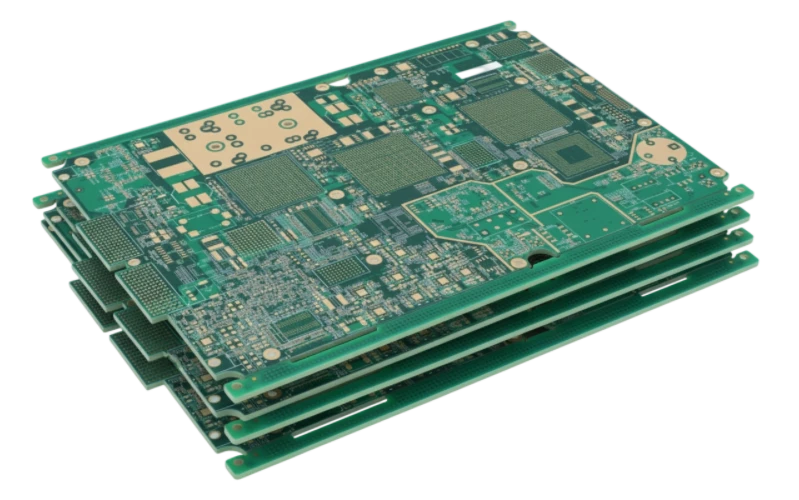
Mini PC PCB: what this playbook covers (and who it’s for)
This guide is designed for hardware engineers and procurement leads tasked with sourcing high-density Mini PC PCB solutions. Unlike standard desktop motherboards, Mini PC boards require aggressive miniaturization, complex thermal management, and high-speed signal integrity within a confined footprint. The margin for error in layout and fabrication is extremely slim.
You will find a structured approach to defining specifications, identifying hidden manufacturing risks, and validating the final product. We move beyond basic datasheets to cover the practical realities of scaling production, from prototype to mass assembly. This is not a theoretical design tutorial; it is a decision-making framework for buying and manufacturing.
At APTPCB (APTPCB PCB Factory), we see many projects fail not because of bad circuit design, but because of mismatched fabrication capabilities or vague acceptance criteria. This playbook bridges that gap, ensuring your requirements translate correctly into a reliable physical board.
When Mini PC PCB is the right approach (and when it isn’t)
Choosing a custom Mini PC architecture is a strategic decision driven by space, performance, and integration needs.
It is the right choice when:
- Space is critical: You are designing a Panel PC PCB for industrial HMI or a compact medical device where standard ATX or ITX form factors do not fit.
- Integration is high: You need to combine computing power with specific interfaces like a PC Oscilloscope front-end or specialized sensor inputs on a single board.
- Thermal density is manageable: You have a clear path to cooling the CPU and GPU within a small enclosure, potentially using heat pipes or chassis coupling.
- Volume justifies NRE: The production volume is sufficient to amortize the higher Non-Recurring Engineering (NRE) costs associated with HDI (High-Density Interconnect) fabrication.
It is NOT the right choice when:
- Off-the-shelf suffices: A standard Raspberry Pi or NUC compute module meets all performance and I/O needs without modification.
- Cooling is impossible: The enclosure cannot support the thermal dissipation required by high-performance processors, leading to constant throttling.
- Budget is ultra-low: The requirement for blind/buried vias and high-layer counts makes these boards more expensive than standard rigid PCBs.
Specs & requirements (before quoting)
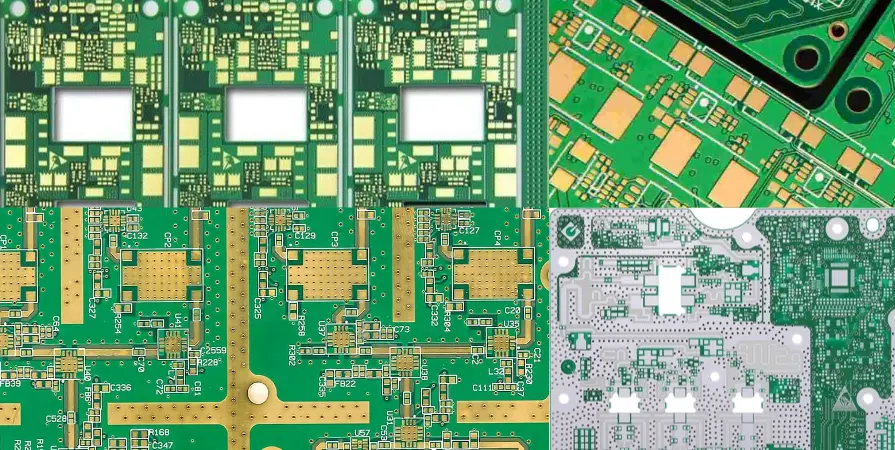
To get an accurate quote and a manufacturable board, you must define these parameters explicitly. Vague specs lead to costly engineering questions (EQs) later.
- Layer Count & Stackup: Typically 8–12 layers for modern Mini PCs. Define signal/ground pairing explicitly to control impedance.
- HDI Technology: Specify blind and buried vias structures (e.g., 2+N+2) if BGA pitch is below 0.5mm.
- Base Material: High Tg FR4 (Tg > 170°C) is mandatory to prevent warping during reflow, especially for All in One PC PCB designs with large screens.
- Copper Weight: Standard 1oz is common, but power planes may need 2oz if the CPU draws significant current.
- Impedance Control: List specific traces (USB 3.0, HDMI, PCIe, DDR) with tolerance (usually ±10% or ±5%).
- Surface Finish: ENIG (Electroless Nickel Immersion Gold) or OSP is preferred for flat pads required by fine-pitch components.
- Thermal Vias: Define hole size, plating thickness, and pattern for thermal pads under processors.
- Minimum Trace/Space: Push for 3/3 mil or 4/4 mil only if necessary; 5/5 mil is safer for yield.
- Soldermask Color: Matte black or green. Matte finishes help with automated optical inspection (AOI) by reducing glare.
- Board Thickness: Standard 1.6mm is typical, but thinner boards (0.8mm–1.2mm) may be needed for ultra-slim housings.
- Cleanliness Standards: Specify IPC-6012 Class 2 or Class 3 depending on reliability requirements.
- Panelization: Define panel margins and fiducials to fit your contract manufacturer’s assembly lines.
Hidden risks (root causes & prevention)
High-density designs introduce specific failure modes that often go unnoticed until mass production.
- Risk: Warpage during Reflow
- Why: Unbalanced copper distribution or thin dielectrics cause bowing.
- Detection: 3D solder paste inspection (SPI) failures or open joints on BGAs.
- Prevention: Balance copper coverage on all layers; use stiffer high-Tg materials.
- Risk: Microvia Reliability
- Why: Poor plating in blind vias leads to cracks under thermal cycling.
- Detection: Intermittent failures after the device warms up.
- Prevention: Mandate IPC Class 3 plating thickness for vias; request cross-section analysis.
- Risk: Signal Crosstalk
- Why: Traces are packed too tightly in Mini PC PCB layouts.
- Detection: Data corruption or EMI failures during certification.
- Prevention: Use guard traces and ensure solid reference planes in the stackup.
- Risk: Thermal Throttling
- Why: PCB acts as a heat trap rather than a spreader.
- Detection: CPU clocks down immediately under load.
- Prevention: Maximize ground pours; use heavy copper; simulate thermal paths in design.
- Risk: Component Shadowing
- Why: Tall connectors block heat from reaching smaller components during reflow.
- Detection: Cold solder joints near tall parts.
- Prevention: Follow DFM spacing rules strictly; optimize reflow oven profiles.
- Risk: Pad Cratering
- Why: Brittle laminate fractures under BGA pads during mechanical stress.
- Detection: Dye-and-pry testing on failed units.
- Prevention: Use resin-filled vias and avoid placing vias directly in pads if possible (or use VIPPO).
- Risk: Impedance Mismatch
- Why: Manufacturer alters stackup height without recalculating trace widths.
- Detection: Signal reflection; USB/HDMI connection drops.
- Prevention: Lock the stackup in the fabrication drawing; require TDR reports.
- Risk: Connector Durability
- Why: Mini PCs undergo frequent plugging/unplugging.
- Detection: Ports lift off pads after minimal use.
- Prevention: Add through-hole anchor tabs for surface mount connectors.
Validation plan (what to test, when, and what “pass” means)

A robust validation plan ensures the Mini PC PCB meets performance goals before you commit to volume.
- Objective: Signal Integrity
- Method: Time Domain Reflectometry (TDR) on test coupons and actual boards.
- Criteria: Impedance within ±10% of design target.
- Objective: Thermal Stress
- Method: Thermal cycling (-40°C to +85°C) for 500+ cycles.
- Criteria: No increase in via resistance; no delamination.
- Objective: Assembly Yield
- Method: X-ray inspection of BGA and QFN components.
- Criteria: < 25% voiding in solder balls; perfect alignment.
- Objective: Power Stability
- Method: Measure voltage ripple on power rails under full CPU/GPU load.
- Criteria: Ripple < 50mV (or per PMIC spec).
- Objective: Mechanical Fit
- Method: Install PCB into chassis with all peripherals connected.
- Criteria: No interference; ports align with cutouts; board does not bend.
- Objective: Functional Test (FCT)
- Method: Boot OS, run stress tests (Prime95, FurMark), check all I/O.
- Criteria: System remains stable for 24 hours; no crashes.
- Objective: Drop Test
- Method: Drop assembled unit from 1m height (if portable).
- Criteria: System boots; no components detached.
- Objective: EMI/EMC
- Method: Pre-compliance scan in a chamber.
- Criteria: Emissions below FCC/CE limits (crucial for All in One PC PCB).
Supplier checklist (RFQ + audit questions)
Use this checklist to vet suppliers like APTPCB before awarding the project.
RFQ Inputs (You provide)
- Gerber files (RS-274X) and Drill files.
- IPC Netlist for electrical test comparison.
- Stackup diagram with material requirements.
- Pick and Place (XY) file for assembly.
- Bill of Materials (BOM) with approved alternates.
- Impedance requirements and controlled dielectric layers.
- Panelization drawing (if you have specific array needs).
- Special notes (e.g., "Do not X-out", "Matte Black Mask").
Capability Proof (Supplier provides)
- Demonstrated capability for blind/buried vias (HDI).
- Minimum track/gap capability (down to 3mil/3mil).
- Experience with high-layer count boards (10+ layers).
- Ability to handle fine-pitch BGAs (0.4mm or less).
- Certifications (ISO 9001, UL, ISO 13485 if medical).
- In-house lamination capability for custom stackups.
Quality System & Traceability
- Do they perform 100% Electrical Test (Flying Probe or Bed of Nails)?
- Is AOI (Automated Optical Inspection) used after inner layer etching?
- Do they offer cross-section reports for via quality?
- Can they provide X-ray inspection images for first articles?
- Is there a system to trace raw material batches to finished lots?
- What is their procedure for handling non-conforming material?
Change Control & Delivery
- Will they notify you before changing material brands?
- What is the standard lead time for EQ (Engineering Question) resolution?
- Do they offer quick-turn prototyping (24-48 hours)?
- How are boards packaged (vacuum sealed with desiccant)?
- Is there a dedicated engineer assigned to your account?
- What is the policy for re-spins due to manufacturing errors?
Decision guidance (trade-offs you can actually choose)
Every Mini PC PCB involves compromise. Here is how to navigate the common trade-offs.
- HDI vs. Through-Hole:
- If you prioritize size: Choose HDI (blind/buried vias) to pack more components.
- Otherwise: Choose through-hole for lower cost, but expect a larger board.
- Material Tg:
- If you prioritize reliability: Choose High Tg (170°C+) to resist heat.
- Otherwise: Standard Tg (130-140°C) is cheaper but risky for dense, hot boards.
- Surface Finish:
- If you prioritize fine pitch: Choose ENIG for flat pads.
- Otherwise: HASL is cheaper but uneven, causing bridges on small parts.
- Copper Weight:
- If you prioritize power: Choose 2oz copper for better current handling and cooling.
- Otherwise: 1oz is standard and easier to etch with fine lines.
- Test Coverage:
- If you prioritize zero defects: Pay for 100% ICT and FCT.
- Otherwise: Flying probe is slower but fine for prototypes; batch testing risks escapes.
- Sourcing:
- If you prioritize speed: Allow supplier to source passives from local stock.
- Otherwise: Consign critical ICs to ensure authenticity.
FAQ
Q: Can I use standard FR4 for a Mini PC PCB? A: It depends on the thermal load. For high-performance processors, standard FR4 may soften. High Tg FR4 is recommended for stability.
- Prevents pad lifting.
- Reduces Z-axis expansion.
Q: How do I handle heat in a fanless Mini PC design? A: You must rely on the PCB and chassis.
- Use heavy copper inner layers.
- Design thermal via farms under hot components.
- Couple the CPU to the metal case.
Q: What is the difference between a Mini PC PCB and a Panel PC PCB? A: They are similar, but Panel PC boards often integrate LVDS/eDP drivers directly for displays.
- Panel PCs need specific mounting holes for screens.
- Mini PCs focus on external I/O ports.
Q: Is it harder to manufacture a board for a PC Oscilloscope? A: Yes, because of the analog front-end sensitivity.
- Requires mixed-signal separation.
- Needs extremely low noise power supplies.
Q: Can you manufacture PCBs for Mini LED Backlight units? A: Yes, these require high precision and often white soldermask for reflectivity.
- High quantity of small LEDs.
- Thermal management is critical for brightness consistency.
Q: What files are needed for a DFM review? A: At minimum, Gerber files and a drill chart.
- Ideally, include the IPC netlist.
- Stackup requirements are crucial for impedance.
Q: Why is impedance control important for Mini PCs? A: High-speed interfaces like USB 3.0, SATA, and DDR memory will fail without it.
- Signals reflect and cause data errors.
- EMI issues increase.
Q: How many layers do I really need? A: Start with 4-6 for simple controllers.
- Go to 8-12 for Intel/AMD based systems with DDR memory.
- More layers allow better signal isolation and power delivery.
Related pages & tools
- HDI PCB Manufacturing – Essential technology for miniaturizing Mini PC motherboards with blind and buried vias.
- High Thermal PCB – Solutions for managing heat in compact, fanless, or high-performance computing designs.
- Box Build Assembly – Full turnkey service to assemble your PCB into its final Mini PC chassis.
- Impedance Calculator – Verify your trace widths for high-speed signals like USB and PCIe before ordering.
- NPI Small Batch Assembly – Perfect for validating your Mini PC prototype before committing to mass production.
Request a quote
Ready to move your Mini PC PCB from design to reality? Request a Quote today and get a comprehensive DFM review along with your pricing.
For the fastest response, please include:
- Gerber files (RS-274X format)
- Layer stackup and impedance requirements
- Bill of Materials (BOM) for assembly
- Estimated volume (prototype vs. production)
- Any special testing or packaging instructions
Conclusion
Successfully launching a Mini PC PCB requires balancing extreme density with thermal and signal integrity. By defining clear specifications for stackup and materials, understanding the risks of miniaturization, and enforcing a strict validation plan, you can avoid the common pitfalls of compact computing design. Use the checklist provided to align your team and your supplier, ensuring a smooth transition from prototype to mass production.