
Self-service technology has transformed how consumers interact with businesses, from ordering food to checking into flights. At the heart of every reliable terminal lies a specialized circuit board: the Payment Kiosk PCB. Unlike standard consumer electronics, these boards must endure 24/7 operation, resist vandalism, and maintain strict security protocols for financial transactions.
Designing and manufacturing a Payment Kiosk PCB requires a balance of durability, signal integrity, and thermal management. A failure in the field does not just mean a broken machine; it means lost revenue and compromised user trust. This guide provides a complete roadmap for engineers and procurement managers, moving from initial definitions to final production validation with APTPCB (APTPCB PCB Factory).
Key Takeaways
- Definition: A Payment Kiosk PCB is the central control unit integrating peripherals like card readers, touchscreens, and printers.
- Security: Layouts must support anti-tamper meshes and comply with PCI DSS standards for secure data handling.
- Durability: Industrial-grade materials are essential to withstand temperature fluctuations in outdoor or semi-outdoor environments.
- Signal Integrity: High-speed routing is critical for
Contactless Paymentmodules (NFC) andBiometric Payment PCBsensors. - Validation: Functional testing (FCT) and In-Circuit Testing (ICT) are non-negotiable to prevent field failures.
- Partnership: Early DFM engagement with APTPCB reduces revision cycles and optimizes manufacturing costs.
What Payment Kiosk PCB really means (scope & boundaries)
Understanding the core definition helps explain why specific metrics are crucial for this hardware. A Payment Kiosk PCB is rarely a single board; it is often a system of boards or a highly integrated mainboard acting as the central nervous system of a self-service terminal.
The scope of this PCB extends beyond simple computing. It serves as the physical and electrical hub for diverse peripherals. It must provide stable power distribution to thermal printers, high-speed data lanes for 4G/5G modems, and noise-free interfaces for capacitive touchscreens.
In modern applications, the definition has expanded. A Check-in Kiosk PCB at an airport requires robust I/O for passport scanning. A Blockchain Payment PCB requires specialized processors for cryptographic verification. Therefore, the "Payment Kiosk PCB" is defined not just by its function, but by its ability to integrate disparate technologies into a stable, secure platform.
Metrics that matter (how to evaluate quality)
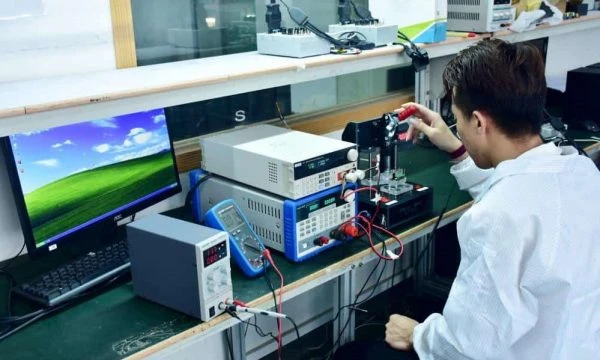
Once the scope is defined, we must quantify performance using specific metrics to ensure the board meets industrial standards. The following table outlines the critical parameters that engineers must monitor during the design and fabrication phases.
| Metric | Why it matters | Typical range or influencing factors | How to measure |
|---|---|---|---|
| Impedance Control | Ensures data integrity for USB, Ethernet, and antenna signals. | 90Ω (USB), 100Ω (Diff pairs), 50Ω (RF). Tolerance ±10%. | Time Domain Reflectometry (TDR) during fabrication. |
| Tg (Glass Transition Temp) | Determines the PCB's ability to withstand heat without deforming. | Tg > 150°C (FR4 High Tg) is recommended for outdoor kiosks. | Differential Scanning Calorimetry (DSC). |
| CTI (Comparative Tracking Index) | Measures resistance to electrical breakdown (tracking) on the surface. | PLC 0 or 1 (600V+) is preferred for high-voltage power sections. | IEC 60112 standard testing. |
| Surface Finish Flatness | Critical for fine-pitch components like BGA processors or secure crypto-chips. | ENIG (Electroless Nickel Immersion Gold) is standard. | Visual inspection and X-ray for solder joint quality. |
| Dielectric Constant (Dk) | Affects signal speed and integrity, crucial for Contactless Payment NFC antennas. |
3.8 to 4.5 for standard FR4; lower for high-speed materials. | Material datasheet verification and signal simulation. |
| Thermal Conductivity | Prevents overheating in enclosed kiosk cabinets. | 1.0 - 3.0 W/mK depending on power density. | Thermal imaging under load. |
Selection guidance by scenario (trade-offs)
These metrics manifest differently depending on the specific deployment environment, requiring distinct design choices. Below are common scenarios and the necessary trade-offs for a successful Payment Kiosk PCB.
1. Outdoor Drive-Thru Kiosk
- Challenge: Extreme temperature fluctuations and humidity.
- Trade-off: Prioritize High-Tg materials and conformal coating over low cost. Standard FR4 may delaminate under direct sunlight.
- Recommendation: Use heavy copper (2oz+) for power rails to reduce resistive heating.
2. High-Volume Retail Check-in Kiosk PCB
- Challenge: Constant physical vibration and 24/7 uptime.
- Trade-off: Prioritize mechanical stability. Use mounting holes with vias connected to ground for EMI shielding, even if it increases board size.
- Recommendation: Select a thicker PCB core (2.0mm or 2.4mm) for rigidity against user touch pressure.
3. Biometric Payment PCB (Fingerprint/Vein Scanner)
- Challenge: Extremely sensitive analog signals susceptible to noise.
- Trade-off: Prioritize signal integrity. Requires a 4-layer or 6-layer stackup with dedicated ground planes, increasing layer count cost.
- Recommendation: Separate analog and digital grounds carefully to prevent digital switching noise from corrupting biometric data.
4. Blockchain Payment PCB (Crypto ATM)
- Challenge: High processing load and security requirements.
- Trade-off: Prioritize thermal management and anti-tamper features. Active cooling may be required, necessitating fan headers and temperature sensors on the PCB.
- Recommendation: Implement fine-pitch BGA routing for high-performance processors.
5. Compact Tabletop Ordering Tablet
- Challenge: Limited space for complex circuitry.
- Trade-off: Prioritize density. Use HDI (High Density Interconnect) technology with blind/buried vias. This increases manufacturing complexity but reduces footprint.
- Recommendation: Use rigid-flex PCBs to connect the mainboard to the screen without bulky connectors.
6. Retrofit Payment Module
- Challenge: Fitting modern tech into legacy enclosures.
- Trade-off: Prioritize form factor. The PCB shape may be irregular.
- Recommendation: Ensure connector placement matches existing wiring harnesses to minimize installation labor.
From design to manufacturing (implementation checkpoints)
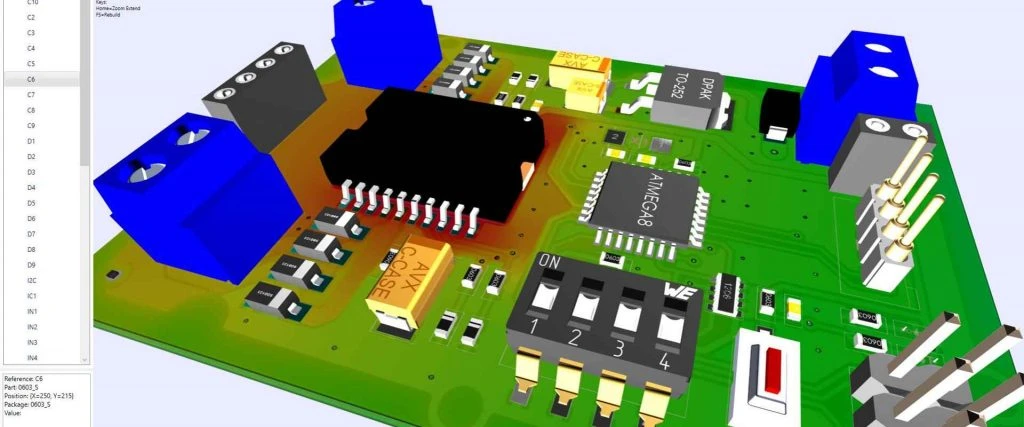
After selecting the right approach for your scenario, the focus shifts to the execution phase to ensure the design is manufacturable. Following a structured checklist prevents costly revisions.
- Schematic Freeze: Ensure all logical connections are final. Changes after this point cascade into layout errors.
- BOM Validation: Check the availability of all components, especially specific connectors for payment devices. Shortages can halt production.
- Stackup Definition: Define the layer stackup early, especially for controlled impedance. Consult with APTPCB to match material stocks.
- Placement Strategy: Place connectors near the board edge for easy cable access. Keep sensitive
Contactless Paymentantennas away from metal shielding. - Routing & Grounding: Route high-speed differential pairs first. Flood unused areas with ground copper to improve EMI performance.
- DFM Review: Submit Gerber files for a Design for Manufacturing check. This identifies features that are too small or too close to drill holes.
- Silkscreen Clarity: Ensure labels for connectors (e.g., "PRINTER", "NFC", "12V") are legible to assist field technicians during maintenance.
- Test Point Access: Place test points on a single side of the PCB to facilitate automated fixture testing (ICT).
- Prototype Run: Manufacture a small batch (5-10 units) to verify fit and function inside the actual kiosk enclosure.
- Assembly (PCBA): Verify the reflow profile, especially if using lead-free solder which requires higher temperatures.
- Conformal Coating: Apply coating if the kiosk is deployed in humid or outdoor environments.
- Final Inspection: Perform Automated Optical Inspection (AOI) and X-ray for BGAs to ensure joint reliability.
Common mistakes (and the correct approach)
Even with a rigorous process, certain pitfalls frequently derail production or cause early field failures.
Mistake 1: Ignoring Thermal Management.
- Issue: Kiosks are often enclosed boxes with poor airflow. PCBs overheat, causing throttling.
- Correction: Perform thermal simulation. Add thermal vias under hot components and ensure the enclosure has intake/exhaust vents aligned with the PCB.
Mistake 2: Poor Connector Placement.
- Issue: Connectors placed in the center of the board are hard to reach, making assembly and repair difficult.
- Correction: Place all user-serviceable connectors on the board edge.
Mistake 3: Inadequate Grounding for ESD.
- Issue: Users carry static charge. Touching the screen or card reader can zap the PCB, resetting the system.
- Correction: Use TVS diodes on all I/O lines and ensure the PCB mounting holes connect to the chassis ground.
Mistake 4: Overlooking Material Selection for RF.
- Issue: Using standard FR4 for high-frequency
Contactless Paymentantennas results in signal loss. - Correction: Use specialized materials or follow strict manufacturer guidelines for antenna trace width and spacing. Consider Megtron PCB materials for very high-speed applications.
- Issue: Using standard FR4 for high-frequency
Mistake 5: Forgetting Anti-Tamper Meshes.
- Issue: Payment terminals require physical security. If a hacker drills into the board, they might access keys.
- Correction: Include a serpentine trace mesh on internal layers that triggers a "self-destruct" (data wipe) if broken.
Mistake 6: Undefined Impedance.
- Issue: USB or Ethernet drops connection intermittently.
- Correction: Use an Impedance Calculator and specify impedance requirements clearly in the fabrication notes.
FAQ
To address lingering uncertainties regarding these mistakes, here are answers to frequent inquiries about Payment Kiosk PCB production.
Q: What is the typical lifespan of a Kiosk PCB? A: A well-designed board should last 5 to 7 years in the field. This depends heavily on thermal management and the quality of the surface finish.
Q: Can I use standard FR4 for outdoor kiosks? A: It is risky. High Tg FR4 (Tg > 170°C) is recommended to prevent expansion and delamination during hot summer days.
Q: How do I ensure my PCB is PCI compliant? A: The PCB itself isn't "compliant," but it supports compliance. You must implement physical security (tamper meshes) and ensure no sensitive traces are exposed on outer layers.
Q: What surface finish is best for payment PCBs? A: ENIG is the industry standard. It offers a flat surface for fine-pitch components and excellent corrosion resistance for long-term reliability.
Q: Does APTPCB handle the assembly of these boards? A: Yes, we offer full turnkey PCB Manufacturing and assembly services, including component sourcing and testing.
Q: How does the layer count affect cost? A: Cost increases with layer count. A 4-layer board is standard for simple kiosks. Complex boards with biometric sensors often require 6 or 8 layers, increasing cost by 30-50%.
Q: What data is needed for a quote? A: Gerber files, Bill of Materials (BOM), Pick and Place file, and a fabrication drawing specifying materials and colors.
Q: Can you assist with the layout design? A: While we focus on manufacturing, our engineering team can provide DFM feedback to optimize your existing layout for production.
Related pages & tools
For deeper technical analysis and to prepare your files, utilize these specific resources.
- PCB Manufacturing Services: Explore our capabilities for rigid, flex, and rigid-flex boards.
- DFM Guidelines: Download our checklist to ensure your design is ready for the factory.
Glossary (key terms)
Finally, precise terminology ensures clear communication during the manufacturing process.
| Term | Definition |
|---|---|
| PCI DSS | Payment Card Industry Data Security Standard; security protocols for handling credit card data. |
| NFC | Near Field Communication; technology used for Contactless Payment. |
| BGA | Ball Grid Array; a type of surface-mount packaging used for high-performance processors. |
| Gerber File | The standard file format used to describe PCB images (copper, solder mask, legend). |
| Fiducial | A marker on the PCB used by assembly machines to align components accurately. |
| Conformal Coating | A protective chemical layer applied to the PCBA to resist moisture and dust. |
| Blind Via | A via connecting an outer layer to one or more inner layers but not going through the entire board. |
| Buried Via | A via connecting inner layers only, invisible from the outside. |
| IPC Class 2 | A manufacturing standard for dedicated service electronic products (most kiosks). |
| IPC Class 3 | A stricter standard for high-reliability products (medical, aerospace, critical banking). |
| Solder Mask | The protective coating (usually green) that covers copper traces to prevent short circuits. |
| Silkscreen | The ink layer used for component labels and logos on the PCB. |
| BOM | Bill of Materials; the list of all components required to assemble the board. |
Conclusion (next steps)
The Payment Kiosk PCB is the silent backbone of the modern self-service economy. Whether you are building a rugged outdoor terminal, a secure Blockchain Payment PCB, or a sleek Check-in Kiosk PCB, the success of your product relies on the quality of this component. Prioritizing impedance control, thermal management, and robust material selection during the design phase will prevent costly field failures later.
To move from concept to production, ensure your data package is complete. When you are ready to quote, provide APTPCB with your Gerber files, stackup requirements, and Bill of Materials. Our engineering team will review your design for manufacturability, ensuring your payment solutions are secure, durable, and ready for the market.