
Key Takeaways
Pick and place is the SMT step where a machine takes each component from its tape, tray, or tube and sets it on the solder paste at the right X/Y position and rotation. It sits between paste printing and reflow in SMT and THT assembly, and most placement defects trace back to the data and setup that feed it. This guide covers the whole workflow, from data preparation to final inspection.
- Definition: Pick and place is the robotic process of lifting electronic components from feeders and placing them onto a printed circuit board (PCB).
- Data is King: A successful run depends entirely on accurate Centroid (XY) files and a clean Bill of Materials (BOM).
- Speed vs. Precision: High-speed chip shooters differ vastly from flexible mounters used for complex ICs; knowing the difference saves costs.
- Vision Systems: Modern machines use optical alignment to correct component rotation and offset before placement.
- Validation: First Article Inspection (FAI) is non-negotiable to prevent high-volume defects.
- Common Pitfall: Ambiguous component polarity markings in the design are a frequent cause of functional failure.
- Reflow Context: Placement is only half the battle; the board must survive the oven, so placement and reflow profile planning go together.
What does pick and place mean in SMD assembly?
In SMD assembly (SMD-Bestückung), "pick and place" names both the machine and the process step. The machine picks a part with a vacuum nozzle, checks it with a camera, and places it on the printed paste. The term is written several ways (pick and place, pick & place, pick-and-place, P&P), and all of them mean the same SMT placement step. PCB component placement is the general term; pick and place is how it is done in production.
| Term | What it refers to |
|---|---|
| Pick and place machine | The automated SMT mounter: gantry or turret head, nozzles, feeders, and vision cameras |
| Pick and place unit / head | The moving head that carries the nozzles (one or many) between feeders and board |
| Pick and place file | The centroid (XY) file with designator, X, Y, rotation, and side for every part |
| Pick and place software | The machine programming software that turns CAD data into a placement program |
| Manual pick and place | A vacuum pen or a manual placement station guided by the operator, used for prototypes |
Scope of this guide
To understand the specific steps in this guide, we must first define the boundaries of the technology and where it fits in the manufacturing line. Pick and place here means the operation and programming of the SMT mounter, which is the heart of the PCB assembly line.
At APTPCB (APTPCB PCB Factory), this process bridges the gap between a bare board and a functional device. The machine utilizes pneumatic suction nozzles or mechanical grippers to transport components. It is not a standalone operation; it sits directly between the solder paste printing process and the reflow oven.
The scope of this tutorial includes:
- Machine Setup: Loading feeders and configuring nozzles.
- Programming: Converting PCB design data into machine coordinates.
- Operation: The actual mounting of parts.
- Verification: Ensuring parts are where they should be before soldering.
This guide applies to everything from desktop prototyping machines to industrial conveyor systems used by APTPCB.
Metrics that matter (how to evaluate quality)
Once you understand the scope of the machinery, you must learn the metrics used to evaluate its performance and suitability for your project. Not all machines are equal, and the following parameters determine if a specific setup can handle your design.
| Metric | Why it matters | Typical range or influencing factors | How to measure |
|---|---|---|---|
| CPH (Components Per Hour) | Determines throughput and manufacturing cost. Higher speed usually means lower cost per unit in volume. | Prototype: 1,000–3,000 CPH Mid-range: 10,000–20,000 CPH High-speed: 50,000+ CPH |
Measured by the machine's software logs during a continuous run, excluding downtime. |
| Placement Accuracy | Critical for small components (0201, 01005) and fine-pitch ICs. Poor accuracy leads to bridges and shorts. | Standard: ±50µm High Precision: ±10µm to ±25µm |
Measured using a glass calibration plate or Cpk analysis of placed components. |
| Component Range | Defines what the machine can physically handle. Some machines cannot lift heavy connectors or tiny resistors. | Min: 01005 imperial Max: 150mm connectors or BGAs |
Verified by checking the nozzle library and vision system specifications. |
| Feeder Capacity | Limits how many unique parts can be loaded at once. Low capacity requires multiple passes or machine reloads. | Small: 20–30 slots (8mm tape) Large: 100+ slots |
Count of available 8mm tape slots on the feeder banks. |
| Changeover Time | The time lost when switching from one product to another. Critical for high-mix, low-volume production. | Fast: <15 mins (swappable carts) Slow: >1 hour (fixed feeders) |
Stopwatch measurement from the last board of Job A to the first good board of Job B. |
| Vision Alignment Speed | "On-the-fly" alignment is faster than "static" cameras that require the head to pause. | Fly-over: Zero delay Look-up: Adds 0.5s per part |
Compare rated CPH with vision enabled vs. vision disabled. |
Pick and place software: from CAD data to a machine program
Pick and place software does three jobs. It imports the centroid file and BOM, maps each part to a package and nozzle in the machine library, and then optimizes the pick path and feeder layout. Most machine vendors ship their own programming software, and EDA tools (Altium, KiCad, Eagle) only export the data it needs.
| Software task | Input | What goes wrong if it is skipped |
|---|---|---|
| Import and origin alignment | Centroid file, board outline, fiducials | Whole board offset; parts placed off the pads |
| Package and nozzle mapping | BOM, MPN, package library | Wrong nozzle, dropped parts, vision rejects |
| Rotation correction | CAD zero orientation vs. tape orientation | Parts rotated 90° or 180°, reversed polarity |
| Path and feeder optimization | Part counts per feeder | Long cycle time, extra changeovers |
| Simulation / dry run | Full program | Collisions with tall parts, missed placements |
Our centroid file basics guide covers the export format and the origin and rotation checks in more detail.
Selection guidance by scenario (trade-offs)
Understanding the metrics allows you to select the right equipment or service level based on your specific production scenario. There is no "perfect" machine, only the right machine for the current job.
Scenario 1: The Hobbyist / One-Off Prototype
- Approach: Manual vacuum pen or tweezers.
- Trade-off: Extremely low cost but high labor time and high risk of human error.
- Best for: Simple boards with fewer than 50 components and no fine-pitch ICs.
Scenario 2: In-House R&D Lab
- Approach: Desktop automatic pick and place machine.
- Trade-off: Moderate cost ($5k–$15k), but slow speeds and limited feeder slots. Requires constant operator attention.
- Best for: Iterating designs quickly without waiting for external shipping.
Scenario 3: Low Volume / High Mix (The Job Shop)
- Approach: Flexible mounter with swappable feeder carts.
- Trade-off: Lower top speed, but very fast changeover between different jobs.
- Best for: Contract manufacturers handling 10 different orders a day with 50–100 boards each.
Scenario 4: High Volume / Low Mix (Mass Production)
- Approach: Chip shooter (turret or rotary head) combined with a multi-function mounter.
- Trade-off: Extremely expensive capital investment and long setup times. Only efficient if running for days without stopping.
- Best for: Consumer electronics (phones, LED drivers) running 10,000+ units.
Scenario 5: Complex RF and BGA Assembly
- Approach: High-precision mounter with upward-looking cameras and force control.
- Trade-off: Slower placement speed to ensure gentle handling and perfect alignment of ball grids.
- Best for: Fine-pitch BGA, QFN, and shielded RF modules where placement accuracy matters more than speed.
Scenario 6: LED Light Bar Assembly
- Approach: Specialized machine with extra-long board support and conveyor rails.
- Trade-off: Specialized mechanics often make these machines poor at handling standard complex PCBs.
- Best for: 1.2-meter LED strips or architectural lighting.
From design to manufacturing (implementation checkpoints)
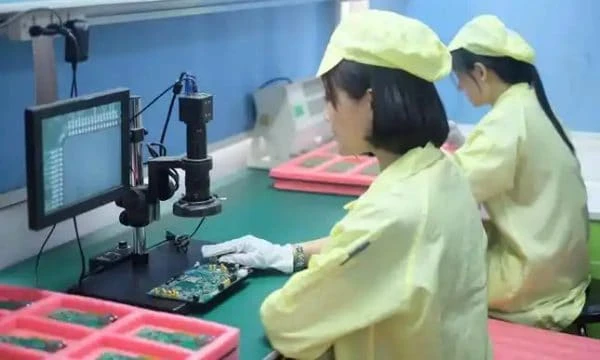
After selecting the right approach, the actual implementation begins. This section outlines the step-by-step checkpoints required to move from a CAD file to a finished PCBA.
1. BOM Scrubbing and Verification
- Recommendation: Ensure every line item has a Manufacturer Part Number (MPN) and a clear designator.
- Risk: Ambiguous parts (e.g., "10k Resistor") lead to sourcing delays or wrong power ratings.
- Acceptance: Use a BOM Viewer tool to validate availability and package types.
2. Centroid File Generation
- Recommendation: Export the "Pick and Place" or "XY Coordinate" file from your EDA tool. It must include X, Y, Rotation, Side (Top/Bottom), and Designator.
- Risk: If the origin point is wrong, the machine will place parts in empty space.
- Acceptance: Open the file in a text editor. Coordinates should match the board dimensions.
3. Panelization and Fiducials
- Recommendation: Add global fiducial markers (1mm copper circles) to the panel rails and local fiducials near fine-pitch ICs.
- Risk: Without fiducials, the machine cannot correct for PCB expansion or stretch, causing misalignment.
- Acceptance: Visual check of the Gerber files.
4. Stencil Design and Paste Printing
- Recommendation: The stencil apertures must match the component footprints exactly.
- Risk: Too much paste causes shorts; too little causes open joints.
- Acceptance: Inspect the paste deposit volume before running the pick and place machine.
5. Feeder Loading and Splicing
- Recommendation: Load components into the correct feeder slots as defined by the machine program.
- Risk: Loading a 10k resistor into the 1k slot is a silent killer; the board will look perfect but fail electrically.
- Acceptance: Barcode scanning verification (smart feeders) or double-check by a second operator.
6. Machine Programming and Optimization
- Recommendation: Import the Centroid file and optimize the pick path to minimize travel distance.
- Risk: Unoptimized paths increase cycle time significantly.
- Acceptance: Simulation run in the machine software.
7. Vision Training
- Recommendation: Teach the machine what each package looks like (body size, lead configuration).
- Risk: The machine will reject good parts if the vision parameters are too strict or incorrect.
- Acceptance: Watch the "reject bin." If it fills up, vision training is poor.
8. First Article Inspection (FAI)
- Recommendation: Run one single board. Inspect it manually or with an automated system.
- Risk: Running a batch of 100 without checking the first one can result in 100 scrap boards.
- Acceptance: 100% visual and value check of the first board. A formal first article inspection compares every placed part against the BOM and drawing before the batch runs.
9. Reflow Profiling
- Recommendation: Ensure the thermal profile matches the paste and component specs. If you are new to profiling, start with the paste manufacturer's datasheet.
- Risk: Thermal shock or cold solder joints.
- Acceptance: Thermocouple probe run on a test board.
10. Automated Optical Inspection (AOI)
- Recommendation: Use AOI inspection after reflow to catch skew, tombstoning, and missing parts.
- Risk: Human inspectors fatigue quickly; AOI is consistent.
- Acceptance: Review AOI logs for false calls vs. real defects.
11. Electrical Testing
- Recommendation: Perform Flying Probe or Bed of Nails testing.
- Risk: Physical placement looks good, but electrical connection is missing.
- Acceptance: Pass/Fail report.
12. Final Cleaning and Packaging
- Recommendation: Remove flux residues if required and package in ESD-safe bags.
- Risk: Corrosion over time or ESD damage during shipping.
- Acceptance: Visual cleanliness check.
Common mistakes (and the correct approach)
Even experienced engineers make errors. Here are the most frequent mistakes observed at APTPCB to help you avoid them.
1. Incorrect Component Polarity
- The Mistake: The designator on the silkscreen is ambiguous, or the CAD footprint rotation does not match the tape-and-reel orientation. This is a classic SMT component polarity issue.
- The Fix: Mark pin 1 clearly on the silkscreen. Standardize footprint libraries. Use the "Zero Orientation" standard (IPC-7351).
2. Missing or Covered Fiducials
- The Mistake: Placing solder mask over fiducials or forgetting them entirely.
- The Fix: Ensure fiducials are bare copper with a clear keep-out zone. Refer to DFM Guidelines for standard sizes.
3. Wrong Nozzle Selection
- The Mistake: Using a small nozzle for a heavy part (part drops) or a large nozzle for a small part (vacuum leak or neighboring part disturbance).
- The Fix: Assign specific nozzles in the machine library based on component weight and surface area.
4. Tombstoning (Manhattan Effect)
- The Mistake: Uneven pad sizes or thermal connections cause one side of a chip to reflow faster, pulling the component upright.
- The Fix: Ensure symmetric thermal relief on pads.
5. Component Height Interference
- The Mistake: Placing a tall capacitor next to a connector, blocking the nozzle's path or the gantry.
- The Fix: Program the machine to place shorter parts first, or ensure adequate spacing between tall components.
6. Warped Boards
- The Mistake: Using thin PCBs (0.8mm or less) without support, causing them to bounce during placement.
- The Fix: Use magnetic support pins or custom vacuum fixtures under the board.
7. Tape Splicing Errors
- The Mistake: Joining two reels of components incorrectly, causing a jam or pitch misalignment.
- The Fix: Use proper splicing tools and brass shims; verify pitch after splicing.
8. Ignoring Moisture Sensitivity Levels (MSL)
- The Mistake: Leaving plastic-encapsulated chips (like BGAs) exposed to air, leading to "popcorning" during reflow.
- The Fix: Bake components if they have been exposed beyond their MSL rating before loading them into the machine.
FAQ
Q: What does "pick and place" mean in SMD assembly? A: It is the automated step that takes each SMD from its feeder and sets it on the solder paste at the programmed position and rotation. The same words name the machine that does it.
Q: Is manual pick and place practical? A: For a few prototype boards with no fine-pitch parts, yes. A vacuum pen or manual placement station works, but placement accuracy and repeatability depend on the operator, so 0201 parts, QFNs, and BGAs are better placed by machine.
Q: Can I use a pick and place machine for through-hole parts? A: Generally, no. While some "odd-form" machines exist, standard pick and place is designed for Surface Mount Devices (SMD). Through-hole usually requires manual insertion or wave soldering.
Q: What is the difference between a Chip Shooter and a Flexible Mounter? A: A chip shooter is optimized for speed and small passive parts (resistors/capacitors), often using a turret head. A flexible mounter is slower but handles large ICs, connectors, and odd shapes with high precision.
Q: How do I generate the Centroid file? A: Most PCB design software (Altium, Eagle, KiCad) has an export function specifically for this. It outputs a CSV or TXT file containing the X, Y, and Rotation data.
Q: Why is my component rotated 90 degrees incorrectly? A: This is a library mismatch. The "zero rotation" in your CAD software might differ from the machine's default. The operator usually corrects this during the setup phase.
Q: Do I need to panelize my boards? A: For machine assembly, yes. Machines work best with standard frame sizes. Single small boards are difficult to clamp. Panelization increases efficiency.
Q: What is the smallest component APTPCB can handle? A: Modern machines can handle 01005 (imperial) components, but 0201 is the standard limit for most cost-effective consumer products.
Q: How does the machine know if a part is picked up correctly? A: It uses a vacuum sensor (checking for pressure drop) and a vision system (camera) to verify the presence and orientation of the part on the nozzle.
Q: What happens if the feeder runs out of parts? A: The machine triggers an alarm and pauses. Operators must splice a new reel or replace the feeder. Smart feeders track component counts to warn operators in advance.
Q: Is pick and place expensive for prototypes? A: Setup costs (programming and stencil) make it expensive for 1-2 boards. However, for batches of 10+, it becomes significantly cheaper and more reliable than manual assembly.
Q: How do I specify component orientation for diodes? A: Use standard industry markings in your assembly drawing. Ensure the cathode is clearly marked. This prevents component polarity errors.
Related pages & tools
To ensure your project is ready for the pick and place process, utilize these resources:
- Check your BOM: Use the BOM Viewer to ensure your parts list is complete and formatted correctly.
- Verify Design Rules: Review our DFM Guidelines to ensure your footprints and fiducials meet manufacturing standards.
- Placement data: Read centroid file basics before exporting your XY file.
Glossary (key terms)
| Term | Definition |
|---|---|
| SMT | Surface Mount Technology. The method of producing circuits where components are mounted directly onto the surface of PCBs. |
| SMD | Surface Mount Device. The actual component (resistor, IC, etc.) designed for SMT. |
| Fiducial | A copper marker (usually a circle) on the PCB used by the machine's vision system for alignment. |
| Nozzle | The tip of the placement head that uses vacuum to pick up the component. |
| Feeder | The mechanism that holds the component tape reel and advances it for the machine to pick. |
| Centroid File | A data file containing the X, Y, rotation, and layer information for every component on the board. |
| Pitch | The distance between the center of one pin to the center of the next pin on an IC. |
| BGA | Ball Grid Array. A type of surface-mount packaging used for integrated circuits. |
| Reflow | The process of melting solder paste to create permanent electrical joints. |
| AOI | Automated Optical Inspection. A machine that visually scans the PCB for defects after placement or soldering. |
| Tombstoning | A defect where a component stands up on one end during reflow due to uneven wetting forces. |
| Tray | A holder for larger components (like QFPs or BGAs) that do not come on tape reels. |
| Solder Paste | A mixture of solder spheres and flux used to attach SMDs to the PCB. |
Conclusion (next steps)
Mastering the pick and place workflow is about more than just understanding how a robot moves. It requires a holistic view of the manufacturing process, from the initial CAD design to the final quality checks. By focusing on accurate data generation, correct component selection, and rigorous validation steps like First Article Inspection, you can eliminate the majority of assembly defects.
Whether you are prototyping a new IoT device or scaling up production for a consumer product, APTPCB can take the job from component sourcing to tested boards through turnkey PCB assembly.
Ready to move to production? Ensure you have the following ready for a smooth quote and DFM review:
- Gerber Files: Including all copper, solder mask, and silkscreen layers.
- Centroid (Pick and Place) File: With accurate X/Y coordinates.
- Bill of Materials (BOM): With manufacturer part numbers.
- Assembly Drawings: Showing component polarity and special instructions.
Send these files through the PCB assembly quote form to start your project.