
Streaming media devices have revolutionized home entertainment, and at the heart of this revolution lies the Roku PCB. Whether you are designing a direct competitor to popular streaming sticks, developing a set-top box, or engineering an integrated smart display, understanding the printed circuit board (PCB) architecture behind these devices is critical. These boards are not merely connectors; they are high-frequency, mixed-signal platforms that must handle 4K/8K video, Wi-Fi connectivity, and power management in an incredibly compact footprint.
This guide serves as a comprehensive hub for engineers and procurement managers. We will walk through the entire lifecycle of a streaming media board—from defining the specs to validating the final product at APTPCB (APTPCB PCB Factory).
Key Takeaways
- Definition Scope: A "Roku PCB" refers to the class of high-density, mixed-signal boards used in streaming media players, requiring tight integration of RF (Wi-Fi/Bluetooth) and high-speed digital (HDMI/USB) signals.
- Critical Metric: Impedance control is the non-negotiable metric; a variance greater than ±10% can cause signal reflection and video buffering issues.
- Material Selection: Standard FR4 is often insufficient for the RF sections; hybrid stackups using high-frequency laminates are common.
- Manufacturing Tip: Due to the small form factor of streaming sticks, High Density Interconnect (HDI) technology with blind and buried vias is almost always required.
- Validation: Automated Optical Inspection (AOI) is not enough; functional testing (FCT) specifically for HDMI throughput and Wi-Fi range is essential.
- Misconception: Not all streaming boards are the same; an Active Speaker PCB with streaming capabilities requires different thermal management than a passive dongle.
- Partnering: Early DFM engagement with APTPCB ensures that your compact design is actually manufacturable at scale.
What Roku PCB really means (scope & boundaries)
Before diving into metrics, we must define the scope of what constitutes a "Roku-style" PCB in a manufacturing context.
In the electronics industry, a Roku PCB is shorthand for a specific category of consumer electronics hardware: Compact Streaming Media Devices. These are not simple logic boards. They represent a convergence of three distinct engineering challenges:
- High-Speed Digital Processing: The board must support processors capable of decoding H.265/HEVC video and outputting via HDMI 2.1. This requires precise routing for differential pairs.
- Radio Frequency (RF) Integration: Unlike a standard controller, these boards act as transceivers. They must house Wi-Fi (often MIMO antennas) and Bluetooth modules without interference from the high-speed digital lines.
- Extreme Miniaturization: The physical constraints of a "stick" form factor force designers to use HDI techniques, placing components on both sides and utilizing microvias.
Related Technologies
This architecture often overlaps with other audio-visual standards. For instance, an Active Speaker PCB often incorporates similar streaming logic to receive audio wirelessly. Similarly, professional audio equipment utilizing the AES67 PCB standard shares the need for low-latency packet transmission, though AES67 is typically more industrial than consumer-focused.
Roku PCB metrics that matter (how to evaluate quality)
Once you understand the scope, you need to measure performance using specific manufacturing metrics. A streaming device PCB fails if it cannot maintain signal integrity under thermal load.
| Metric | Why it matters | Typical Range / Factor | How to Measure |
|---|---|---|---|
| Differential Impedance | Ensures HDMI and USB data integrity without jitter or loss. | 90Ω or 100Ω ±10% (strict) | TDR (Time Domain Reflectometry) coupons. |
| Thermal Conductivity | Streaming processors generate significant heat in a sealed plastic case. | 1.0 W/mK to 3.0 W/mK (depending on dielectric). | Thermal imaging under load; material datasheet verification. |
| Dielectric Constant (Dk) | Critical for the RF/Wi-Fi section to ensure antenna efficiency. | 3.4 to 4.5 (stable over frequency). | Vector Network Analyzer (VNA) on test traces. |
| Bow and Twist | The board must remain perfectly flat to fit into slim housings and ensure BGA reliability. | < 0.75% (IPC Class 2 standard). | Laser profilometry or feeler gauge on surface plate. |
| Solder Mask Web | Prevents solder bridging on fine-pitch BGAs (processors). | Min 3-4 mil (0.075mm). | AOI (Automated Optical Inspection). |
How to choose Roku PCB: selection guidance by scenario (trade-offs)
Knowing the metrics helps, but real-world application dictates the choice of materials and stackup. Below are common scenarios for streaming device PCBs and how to choose the right configuration.
Scenario 1: The 4K/8K Streaming Stick (Dongle)
- Requirement: Extreme size constraints, high heat, high speed.
- Recommendation: Use High Density Interconnect (HDI) technology. You will need a 6-to-8 layer Any-Layer HDI board.
- Trade-off: Higher cost per unit due to laser drilling, but essential for fitting the form factor.
Scenario 2: The Set-Top Box (STB)
- Requirement: Larger footprint allowed, multiple ports (Ethernet, USB, Optical), lower cost pressure.
- Recommendation: Standard 4-to-6 layer Rigid PCB using high-Tg FR4. Through-hole technology is acceptable for connectors.
- Trade-off: Larger physical size, but significantly cheaper to manufacture than HDI.
Scenario 3: Integrated Smart Display Module
- Requirement: The PCB sits behind a hot LCD panel; thermal management is paramount.
- Recommendation: Metal Core PCB (MCPCB) is rarely used for the logic, but a Rigid PCB with heavy copper or thermal via farms connected to a chassis heatsink is required.
- Trade-off: Increased weight and complexity in mechanical assembly.
Scenario 4: Audiophile Streaming Node (AES67)
- Requirement: Extremely low noise floor, audio purity, synchronization.
- Recommendation: Hybrid stackup. Use high-frequency Rogers materials for the clocking and analog sections, combined with FR4 for digital logic.
- Trade-off: Material costs are 3-5x higher than standard FR4, but necessary for audio fidelity.
Scenario 5: Low-Cost 1080p Streamer
- Requirement: Lowest possible BOM cost.
- Recommendation: 4-layer standard FR4 with careful routing to avoid EMI issues without expensive shielding cans.
- Trade-off: Higher risk of EMI failure; requires more design iterations to pass certification.
Scenario 6: Active Speaker Integration
- Requirement: Vibration resistance and power handling.
- Recommendation: Thicker board (2.0mm or 2.4mm) to resist vibration from the speaker driver.
- Trade-off: Non-standard thickness may increase lead time slightly.
Roku PCB implementation checkpoints (design to manufacturing)
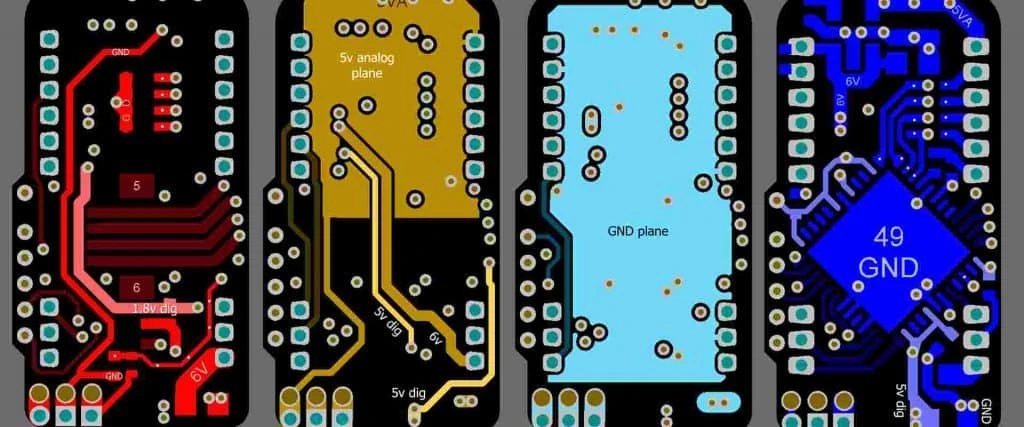
After selecting the right board type, the focus shifts to execution. Use this checklist to move from design files to a physical board with APTPCB.
Stackup Definition:
- Recommendation: Define layer stackup before routing. Consult the factory for available prepreg thicknesses.
- Risk: Redesigning impedance traces if the factory cannot match your theoretical stackup.
- Acceptance: Approved stackup diagram from CAM engineer.
Impedance Modeling:
- Recommendation: Calculate trace widths for HDMI (100Ω diff) and USB (90Ω diff).
- Risk: Signal reflection causing "snow" or black screens.
- Acceptance: TDR simulation report.
BGA Fanout Strategy:
- Recommendation: Use dog-bone or via-in-pad (VIPPO) for fine-pitch processors (<0.5mm pitch).
- Risk: Short circuits or insufficient breakout room.
- Acceptance: DFM review confirming no DRC violations.
RF Shielding Preparation:
- Recommendation: Design exposed ground rings for soldering EMI shielding cans over the Wi-Fi/CPU sections.
- Risk: Failing FCC/CE radiation tests.
- Acceptance: Solder mask expansion verification.
Thermal Via Placement:
- Recommendation: Place stitched vias under the main SoC (System on Chip) connecting to ground planes.
- Risk: Processor throttling (slowing down) during movie playback.
- Acceptance: Thermal simulation or prototype stress test.
Surface Finish Selection:
- Recommendation: Use ENIG (Electroless Nickel Immersion Gold) for flat pads required by BGAs.
- Risk: OSP may oxidize; HASL is too uneven for fine-pitch components.
- Acceptance: Specification in fabrication notes.
Antenna Keep-Out Zone:
- Recommendation: Ensure no copper exists on any layer near the PCB antenna.
- Risk: Drastic reduction in Wi-Fi range.
- Acceptance: Gerber layer review.
Panelization for Assembly:
- Recommendation: Add tooling strips and fiducials for turnkey assembly services.
- Risk: Inability to run through pick-and-place machines efficiently.
- Acceptance: Panel drawing approval.
Roku PCB common mistakes (and the correct approach)
Even with a solid plan, specific pitfalls can derail production. Here are the most frequent errors we see at APTPCB.
- Mistake 1: Ignoring the "Reference Plane."
- Issue: Routing high-speed HDMI signals over a split in the ground plane.
- Correction: Always route differential pairs over a solid, uninterrupted ground plane to maintain return paths.
- Mistake 2: Placing noisy power inductors near the RF section.
- Issue: The switching noise couples into the Wi-Fi signal, causing connection drops.
- Correction: Physically separate the Power Management IC (PMIC) from the RF module and use shielding.
- Mistake 3: Over-specifying drill sizes.
- Issue: Using mechanical drills for holes smaller than 0.15mm.
- Correction: Switch to laser drilling (HDI) for microvias under 0.15mm.
- Mistake 4: Neglecting edge plating.
- Issue: EMI leaking from the sides of the board.
- Correction: Use castellation or edge plating to ground the PCB edges, creating a Faraday cage effect.
- Mistake 5: Assuming all FR4 is the same.
- Issue: Using standard Tg130 material for a device that runs hot.
- Correction: Specify High-Tg (Tg170) FR4 to prevent board delamination during operation.
- Mistake 6: Forgetting the "Active Speaker" vibration factor.
- Issue: Using standard solder alloys in a PCB mounted inside a vibrating speaker cabinet.
- Correction: Use flexible glue or underfill on large components to prevent solder fatigue cracks.
Roku PCB FAQ (cost, lead time, materials, testing, acceptance criteria)
To clarify lingering doubts, here are answers to frequent inquiries regarding streaming media PCB manufacturing.
Q: What factors influence Roku PCB cost the most? A: The layer count and the use of HDI technology are the biggest cost drivers. A 4-layer through-hole board is significantly cheaper than an 8-layer Any-Layer HDI board. Gold thickness (ENIG) also impacts price.
Q: What is the typical Roku PCB lead time for prototypes? A: For standard designs, APTPCB can deliver prototypes in 24-48 hours. For complex HDI designs involving laser drilling and sequential lamination, expect 5-8 working days.
Q: Which Roku PCB materials are best for 5GHz Wi-Fi performance? A: While High-Tg FR4 works for short traces, we recommend low-loss materials like Megtron 6 or Rogers RO4000 series for the specific RF layers if the trace length is significant.
Q: What are the standard Roku PCB testing requirements? A: Beyond standard E-test (Open/Short), these boards require Impedance Testing (TDR) and often X-ray inspection for BGA soldering quality.
Q: What are the Roku PCB acceptance criteria for mass production? A: We follow IPC-A-600 Class 2 as a baseline. However, for high-reliability streaming devices, we recommend specifying IPC Class 3 for plating thickness and annular rings.
Q: Can I use a standard PCB for an AES67 PCB audio project? A: You can, but you must pay extreme attention to grounding. A 4-layer board is the absolute minimum; a 6-layer board is preferred to dedicate layers to audio ground and power, separating them from digital noise.
Q: Do I need blind and buried vias for a streaming stick? A: Almost certainly. The surface area is too small to route all connections using only through-holes. Blind vias allow you to route signals on inner layers without blocking space on the outer layers.
Q: How do I ensure my design is manufacturable before ordering? A: Submit your Gerber files for a DFM guideline review. We check for minimum trace width, spacing, and drill-to-copper distances.
Resources for Roku PCB (related pages and tools)
For deeper technical data and manufacturing capabilities, explore these related resources:
- Impedance Calculator: Verify your trace widths before design.
- HDI Capabilities: Detailed specs on laser drilling and microvias.
- Rogers/RF Materials: Datasheets for high-frequency laminates.
- Assembly Services: Information on BGA mounting and X-ray inspection.
Roku PCB glossary (key terms)
Finally, ensure your team speaks the same language when discussing specifications.
| Term | Definition |
|---|---|
| HDI | High Density Interconnect. PCBs featuring higher wiring density per unit area, using microvias. |
| Microvia | A hole with a diameter of less than 0.15mm, typically laser-drilled, connecting adjacent layers. |
| Impedance Control | Matching PCB trace properties to the source and load to prevent signal reflection (vital for HDMI). |
| ENIG | Electroless Nickel Immersion Gold. A flat surface finish ideal for soldering fine-pitch components. |
| BGA | Ball Grid Array. A type of surface-mount packaging used for processors (SoCs). |
| Castellation | Plated half-holes on the edge of a PCB, used to solder one module onto another. |
| EMI | Electromagnetic Interference. Noise that disrupts signal clarity; requires shielding. |
| AES67 | An interoperability standard for high-performance audio-over-IP streaming. |
| Tg (Glass Transition) | The temperature at which the PCB base material begins to soften and lose rigidity. |
| DFM | Design for Manufacturing. The process of designing a PCB to make it easy and cheap to manufacture. |
| Gerber File | The standard file format used by the PCB industry to describe the board images. |
| Stackup | The arrangement of copper layers and insulating material (prepreg/core) in a PCB. |
Conclusion (next steps)
Summarizing the journey from definition to validation, manufacturing a Roku PCB or any high-performance streaming media board requires a balance of signal integrity, thermal management, and miniaturization. Whether you are building a consumer dongle, an Active Speaker PCB, or an industrial AES67 PCB interface, the margin for error is slim.
To move forward with your project, prepare the following for your manufacturer:
- Gerber Files (RS-274X).
- BOM (Bill of Materials) if assembly is required.
- Stackup Requirements (impedance values and layer count).
- Testing Procedures (if functional testing is needed).
APTPCB specializes in these complex, high-frequency builds. Contact our engineering team today to review your files and ensure your streaming device performs flawlessly in the real world.