
A Timing Controller PCB (T-Con Board) is the critical bridge between a video source (motherboard) and the display panel (LCD, OLED, or DMD). It translates high-speed video signals—such as LVDS, eDP, or MIPI—into the specific row and column driver signals required by the source and gate drivers of the screen.
For engineers and procurement managers, the Timing Controller PCB represents a unique challenge. It requires strict impedance control for signal integrity, precise thermal management to protect the scaler IC, and often a highly constrained mechanical form factor to fit within ultra-thin display bezels. This guide covers the essential specifications, manufacturing rules, and troubleshooting steps to ensure your T-Con design functions correctly in production.
Quick Answer (30 seconds)
If you are designing or sourcing a Timing Controller PCB, these are the non-negotiable parameters you must validate immediately.
- Impedance Control is Mandatory: Most T-Con boards require 100Ω or 90Ω differential impedance for LVDS/eDP pairs. A deviation of >10% will cause signal reflection and visual artifacts.
- Layer Stackup: A minimum 4-layer stackup is standard to provide solid ground reference planes for high-speed signals. High-end 4K/8K controllers may require 6 or 8 layers.
- Surface Finish: Use ENIG (Electroless Nickel Immersion Gold) for flat pads and reliable ZIF (Zero Insertion Force) connector contacts. HASL is generally too uneven for the fine-pitch components used on T-Cons.
- Thermal Vias: The main timing IC generates significant heat. You must place thermal vias under the exposed pad (e-pad) connecting to internal ground planes.
- Mechanical Constraints: T-Con boards are often long and narrow. Panelization requires breakaway tabs (mouse bites) placed carefully to avoid stress fractures on ceramic capacitors during depanelization.
- Connector Quality: The FFC/FPC connectors are the most common failure point. Specify high-retention connectors and ensure the PCB footprint matches the manufacturer's recommended land pattern exactly.
When Timing Controller PCB applies (and when it doesn’t)
Understanding when a dedicated T-Con board is necessary versus when the function is integrated into the mainboard is crucial for system architecture.
When a dedicated Timing Controller PCB is required
- High-Resolution Displays: Panels with 1080p, 4K, or 8K resolution almost always require a dedicated T-Con to handle the high bandwidth and complex timing requirements.
- Panel-Specific Voltage Requirements: When the display panel requires specific bias voltages (VGH, VGL, VCOM) that the main motherboard PMIC does not supply.
- Physical Separation: In designs where the motherboard is located far from the panel (e.g., industrial kiosks, automotive dashboards), a T-Con placed directly on the panel minimizes noise on the sensitive driver signals.
- Signal Conversion: When the mainboard outputs a standard signal (e.g., HDMI or DisplayPort) but the raw panel requires LVDS or V-by-One.
- OLED and DMD Applications: An OLED Controller PCB or DMD Controller PCB (for projectors) manages complex pixel-level current driving and mirror switching that standard MCUs cannot handle.
When it is NOT required
- MCU-Direct Drive: Simple low-resolution screens (e.g., 320x240 TFTs) often interface directly with an MCU via SPI, I2C, or parallel RGB interfaces.
- Integrated Panels: Many modern mobile phone screens and smaller tablets have the timing controller logic integrated directly onto the glass (COG - Chip on Glass) or the attached flex cable (COF - Chip on Film).
- Simple Segment Displays: 7-segment displays or character LCDs do not use T-Con architecture.
- Low-Speed Industrial Control: A Motion Controller PCB might drive a display, but if the display is a simple status screen, the motion controller likely drives it directly without an intermediate T-Con.
Rules & specifications
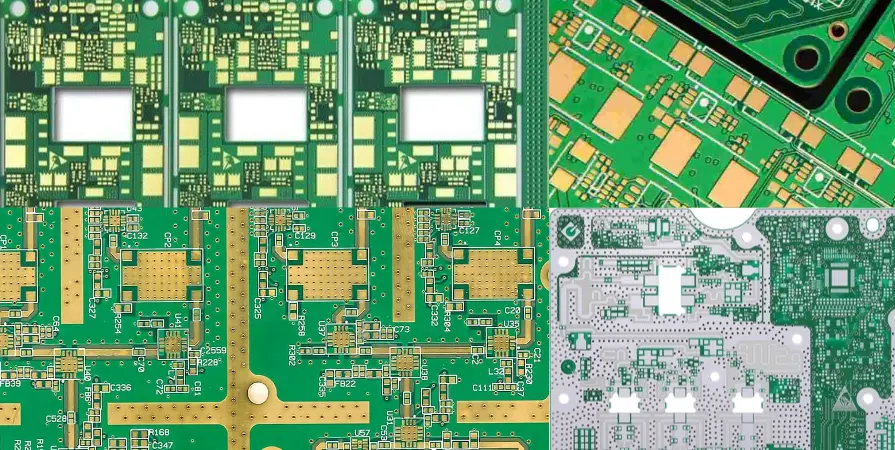
The following table outlines the critical design rules for manufacturing a reliable Timing Controller PCB. These values are based on standard capabilities at APTPCB (APTPCB PCB Factory) and general industry best practices.
| Rule Category | Recommended Value/Range | Why it matters | How to verify | If ignored |
|---|---|---|---|---|
| Differential Impedance | 90Ω ±10% (USB/MIPI) or 100Ω ±10% (LVDS/HDMI) | Ensures signal integrity and prevents reflections that corrupt video data. | Use an Impedance Calculator during design; TDR testing during fab. | Screen flickering, "snow" noise, or complete signal loss. |
| Trace Width/Spacing | Min 4mil / 4mil (0.1mm) | T-Con ICs often have fine-pitch BGAs or QFNs requiring tight routing. | Design Rule Check (DRC) in CAD software. | Short circuits during etching or assembly bridging. |
| Via Size | 0.2mm (8mil) drill / 0.45mm pad | Small vias are needed to route signals out of high-density controller ICs. | Check drill chart in Gerber files. | Impossible to route signals out of the BGA; breakout failure. |
| Copper Weight | 1oz (35µm) outer / 0.5oz inner | Standard weight balances current capacity for PMIC rails with fine-line etching capability. | Review stackup documentation. | 2oz is too thick for fine lines; 0.5oz outer may overheat on power rails. |
| Surface Finish | ENIG (Immersion Gold) | Provides a flat surface for fine-pitch components and corrosion resistance for ZIF contacts. | Visual inspection; specification in fabrication notes. | HASL creates uneven pads, leading to solder bridges on fine-pitch ICs. |
| Board Thickness | 1.0mm or 1.2mm | T-Cons often need to be thinner than standard 1.6mm to fit inside slim monitor housings. | Caliper measurement. | Mechanical interference; the housing won't close. |
| Solder Mask Color | Green or Blue | Standard colors allow for easier automated optical inspection (AOI). Black mask hides traces, making troubleshooting hard. | Visual check. | Higher inspection costs; difficult manual rework. |
| Gold Fingers | Hard Gold (if edge connector used) | If the PCB plugs directly into a socket, hard gold withstands repeated insertion. | Specify "Hard Gold" on fabrication drawing. | ENIG is too soft and will wear off after a few insertions, causing connection failure. |
| Thermal Vias | 0.3mm drill, tented or plugged | Transfers heat from the T-Con IC to the ground plane. | Inspect thermal pad footprint in CAD. | The Controller IC overheats and shuts down or burns out. |
| Length-Matching | < 5mil mismatch within pairs | Differential pairs must arrive at the receiver simultaneously to maintain phase. | CAD length-tuning tools. | Timing skew causes data errors and color corruption. |
| Decoupling Caps | 0402 or 0201 size, close to pins | High-speed switching requires immediate current availability to prevent voltage droop. | Review placement in 3D viewer. | Unstable power rails; random resets or video glitches. |
| Fiducials | 3 global + 2 per fine-pitch IC | Essential for pick-and-place machines to align components accurately. | Visual check on panel rails and near ICs. | Component misalignment; high assembly defect rate. |
Implementation steps
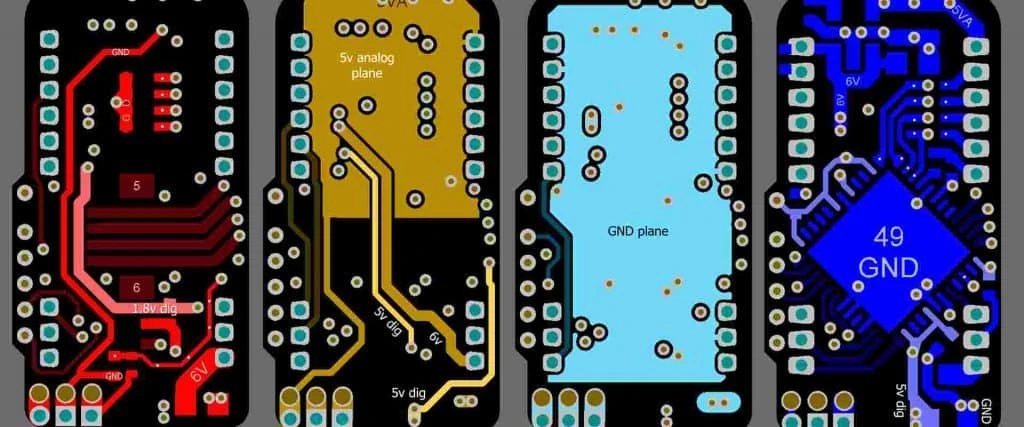
Successfully deploying a Timing Controller PCB involves a systematic approach from schematic to assembly. Follow this workflow to minimize revisions.
1. Interface Definition & Component Selection
Identify the input signal (e.g., 4-lane LVDS) and the output requirement (e.g., mini-LVDS for the panel). Select a T-Con IC that supports the specific resolution and refresh rate (e.g., 60Hz vs 120Hz). If you are designing a Lens Controller PCB or Motion Controller PCB that includes display elements, ensure the main processor has the correct video output peripheral.
2. Stackup Design & Impedance Calculation
Before routing a single trace, define the layer stackup. For a standard T-Con:
- Layer 1 (Top): High-speed signals and components.
- Layer 2 (GND): Solid ground plane for reference.
- Layer 3 (PWR/Signal): Power planes and low-speed signals.
- Layer 4 (Bottom): Non-critical signals. Use the APTPCB Impedance Calculator to determine the trace width required for 100Ω differential impedance on your specific stackup.
3. Critical Placement
Place the input connector and output connectors first, as their location is usually dictated by the mechanical housing. Place the T-Con IC centrally to minimize trace lengths. Place the PMIC (Power Management IC) and its inductors close to the power entry point to keep high-current loops small.
4. High-Speed Routing
Route the differential pairs first.
- Keep pairs parallel and symmetric.
- Avoid 90-degree bends; use 45-degree or curved traces.
- Do not route high-speed signals over splits in the ground plane.
- Ensure length matching is applied at the source (near the IC).
5. Power Plane Management
T-Con boards generate multiple voltages (3.3V, 1.2V core, VGH, VGL). Use wide copper pours or dedicated internal planes for these rails. Ensure the return path for these currents is not blocked by dense signal routing.
6. DFM & DRC Check
Run a Design Rule Check (DRC) to verify clearances. Then, perform a Design for Manufacturing (DFM) review. Check for "acid traps" (acute angles), slivers of solder mask, and sufficient clearance between copper and the board edge. You can consult DFM Guidelines for specific clearance values.
7. Fabrication Data Generation
Generate Gerber files (RS-274X), drill files, and pick-and-place data. Include a fabrication drawing that specifies the impedance requirements, surface finish (ENIG), and total board thickness.
8. Prototype Validation
Once the boards are assembled, validate the power rails first using a multimeter. Then, use an oscilloscope to check the "eye diagram" of the high-speed data lines. A wide-open eye indicates good signal integrity.
Failure modes & troubleshooting
Even with robust design, Timing Controller PCBs can fail. Here is a guide to diagnosing common issues.
1. No Video / Black Screen
- Cause: Loss of power or missing clock signal.
- Check: Measure the 12V/5V input fuse (often near the connector). Check if the 3.3V and 1.2V rails are present. Verify the LVDS clock pair with an oscilloscope.
- Fix: Replace blown fuse (check for shorts first). Reflow the T-Con IC if cold solder joints are suspected.
- Prevention: Use appropriate fuse rating (I_hold > max current). Ensure thermal profile during reflow is correct.
2. Solarization (Inverted/Weird Colors)
- Cause: Gamma correction failure or damaged AS15/AS19 gamma buffer IC (common in older designs).
- Check: Measure the gamma voltage test points (GM1 to GM14). They should step down/up monotonically. If the voltage jumps randomly, the gamma IC is bad.
- Fix: Replace the Gamma IC.
- Prevention: Ensure adequate heat dissipation for the Gamma IC.
3. Vertical Lines or Bars
- Cause: Poor connection between the T-Con and the Source Drivers (COF), or a damaged trace on the T-Con output.
- Check: Press gently on the FFC cables. If the lines change, it is a connection issue. Inspect the PCB for scratches cutting through traces.
- Fix: Reseat cables. Clean ZIF connectors with isopropyl alcohol. If the PCB trace is cut, jump it with a wire (difficult on fine pitch).
- Prevention: Use high-quality ZIF connectors and secure cables with Kapton tape.
4. Image Ghosting / Slow Response
- Cause: VGH/VGL voltages are out of spec, preventing the transistors in the panel from switching fully.
- Check: Measure VGH (usually ~20V to 30V) and VGL (usually -5V to -10V).
- Fix: Check the charge pump circuit components (diodes and capacitors) on the T-Con.
- Prevention: Use capacitors with low ESR and appropriate voltage ratings (derating).
5. White Screen
- Cause: The panel is receiving backlight power but no data/power for the logic. Often a blown fuse on the T-Con input.
- Check: Input voltage at the fuse vs. after the fuse.
- Fix: Replace fuse.
- Prevention: Check for shorted ceramic capacitors on the input rail which might have caused the fuse to blow.
6. EMI / Radio Interference
- Cause: Poor grounding, lack of shielding, or high-speed signals radiating.
- Check: Spectrum analyzer near the LVDS cable.
- Fix: Add shielding tape over the T-Con. Add ferrite beads on the input cable.
- Prevention: Use a 4+ layer stackup with ground planes on outer layers where possible. Stitch ground vias around the board edge.
Design decisions
When configuring your Timing Controller PCB, several strategic decisions impact cost and performance.
Material Selection: FR4 vs. High-Speed Materials
For most standard 60Hz displays, standard FR4 (Tg150 or Tg170) is sufficient. However, for 144Hz gaming monitors or 8K resolution, the dielectric loss of standard FR4 may attenuate signals too much. In these cases, consider "Spread Glass" FR4 or specialized low-loss materials. While APTPCB offers advanced materials, standard FR4 is the most cost-effective starting point.
Connector Strategy: ZIF vs. Board-to-Board
- ZIF (Zero Insertion Force): Uses a flat flex cable (FFC). Cheap and low profile. Best for permanent connections inside a monitor chassis.
- Board-to-Board (B2B): Rigid connectors that snap together. More expensive but more robust against vibration. Preferred for automotive or industrial Motion Controller PCB setups where vibration is a factor.
Integrated vs. Discrete Gamma
Modern T-Con ICs often include the Gamma buffer and PMIC internally. This saves board space (critical for OLED Controller PCB designs in mobile devices) but concentrates heat. Discrete designs spread the heat but require a larger board area.
Test Point Strategy
Always include test points for:
- Input Voltage (VIN)
- Core Voltage (VCC_CORE)
- Gamma Voltages (VGM_High, VGM_Low)
- Clock Signals Without these, troubleshooting a failed board on the production line is nearly impossible.
FAQ
Q: What is the difference between a T-Con Board and a Scaler Board? A: A Scaler Board (Mainboard) takes video inputs (HDMI, VGA) and scales the image to the panel resolution. The Timing Controller PCB takes that scaled digital signal and generates the precise timing pulses to drive the actual pixels on the glass.
Q: Can I use a universal Timing Controller PCB for any panel? A: Generally, no. While "universal" T-Cons exist for repair technicians, they must be programmed with the specific firmware for the panel's resolution, voltage, and timing parameters. The pinout of the LVDS cable must also match exactly.
Q: Why do T-Con boards get so hot? A: They process massive amounts of data at high frequency. A 4K 60Hz signal requires processing nearly 500 million pixels per second. This switching activity generates heat, requiring thermal vias and sometimes heatsinks.
Q: What is the typical lead time for manufacturing a T-Con PCB? A: For standard 4-layer FR4 boards, APTPCB can often produce prototypes in 24-48 hours. Volume production typically takes 5-10 days depending on quantity and material availability.
Q: Do I need impedance control for a simple LCD Controller PCB? A: If the interface is LVDS, MIPI, or eDP, yes. Even for lower resolutions, impedance mismatches can cause radiated emissions (EMI) that fail certification, even if the image looks okay.
Q: Can I repair a T-Con board by reflowing it? A: Sometimes. If the failure is due to thermal cycling cracking a solder joint (BGA fracture), a reflow might fix it temporarily. However, if the IC silicon is damaged, reflow will not help.
Q: What is the "Gamma Correction" function on the T-Con? A: The human eye does not perceive brightness linearly. The T-Con adjusts the voltage levels for each color value so that the displayed gradient looks natural to the human eye.
Q: Why are Gold Fingers recommended for T-Con inputs? A: If the T-Con plugs into a card-edge connector, Gold Fingers (Hard Gold) are essential. ENIG is too soft and will scrape off, leading to oxidation and connection failure.
Q: How do I specify the "Mouse Bites" for panelization? A: Use a 5-hole pattern with 0.5mm holes. Ensure the tabs are not placed near ceramic capacitors or the T-Con IC, as the stress of breaking the tab can crack these brittle components.
Q: What is the cost driver for T-Con PCBs? A: Layer count (4 vs 6), surface finish (ENIG is more expensive than HASL), and the requirement for impedance control testing coupons.
Related pages & tools
To ensure your Timing Controller PCB project succeeds, utilize these resources during your design and ordering process:
- PCB Manufacturing Services: Review capabilities for fine-pitch routing and multilayer stackups.
- Impedance Calculator: Essential for calculating trace widths for 90Ω/100Ω differential pairs.
- DFM Guidelines: Download the checklist to prevent manufacturing holds before you submit your files.
Glossary (key terms)
| Term | Definition | Relevance to T-Con |
|---|---|---|
| LVDS | Low-Voltage Differential Signaling | The most common interface standard for transmitting video data to the T-Con. |
| eDP | Embedded DisplayPort | A newer, faster interface used in laptops and high-res panels, replacing LVDS. |
| MIPI DSI | Mobile Industry Processor Interface | Common in mobile/tablet OLED Controller PCB designs; uses differential pairs. |
| PMIC | Power Management Integrated Circuit | Generates the various voltage rails (VGH, VGL, VCC) needed by the panel. |
| VGH / VGL | Voltage Gate High / Low | Bias voltages required to switch the thin-film transistors (TFTs) in the panel on and off. |
| Gamma | Luminance correction curve | Voltage reference points used to ensure colors are displayed correctly. |
| ZIF | Zero Insertion Force | A type of connector used with flat flex cables (FFC); requires careful handling. |
| Differential Pair | Two complementary signals | Used to transmit data with high noise immunity; requires strict impedance control. |
| Skew | Timing mismatch | The time difference between the arrival of the positive and negative signals in a pair. |
| Crosstalk | Signal interference | Noise induced on a trace by a neighboring trace; minimized by proper spacing. |
| Fiducial | Optical alignment marker | Copper circles used by assembly machines to align the PCB and components. |
| COF | Chip on Film | A technology where the driver IC is mounted directly on the flex cable connecting the T-Con to the glass. |
Conclusion
Designing a Timing Controller PCB requires a balance of high-speed signal integrity, thermal management, and mechanical precision. Whether you are building a custom LCD Controller PCB for an industrial HMI or a high-performance OLED Controller PCB for consumer electronics, adhering to strict impedance rules and DFM guidelines is the only way to ensure a defect-free product.
From selecting the right stackup to verifying the final impedance, every step matters. APTPCB specializes in manufacturing high-precision PCBs that meet these rigorous demands. If you are ready to move from design to production, ensure your data is ready for the factory floor.