
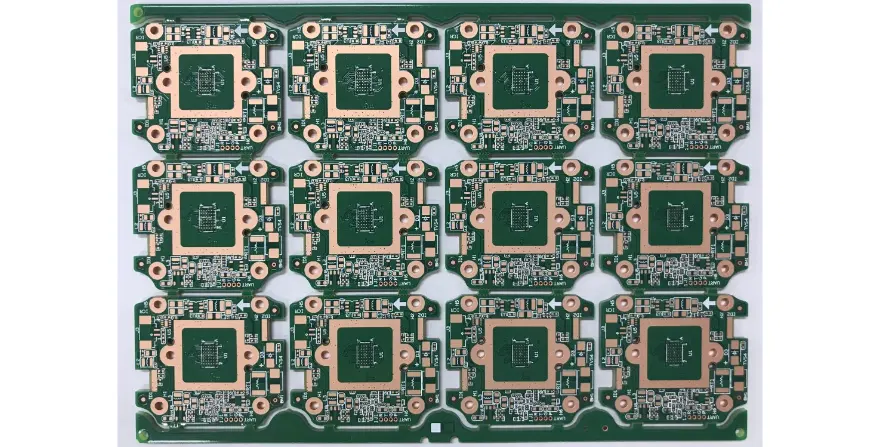
A touch driver PCB converts changes in capacitive or force-sensitive input into reliable touch coordinates, gestures, or control signals. The controller IC is only one part of the system. Production performance depends on the complete electrical and mechanical stack: sensor pattern, cover material, display module, FPC routing, grounding, enclosure, firmware tuning, and environmental conditions.
A touch interface that works on a laboratory bench can fail after integration because display switching noise, charger interference, water films, glove materials, adhesive changes, or enclosure grounding alter the sensing environment.
What should be decided before designing a touch driver PCB?
Before schematic and layout release, define:
- Touch sensing method and channel count
- Sensor electrode pattern and active area
- Cover material and thickness
- Display technology and refresh behavior
- FPC or rigid PCB construction
- Host communication interface
- Glove, water, stylus, and proximity requirements
- ESD and EMC environment
- Firmware tuning ownership
- Production calibration method
The sensor, mechanical stack, and electronics should be treated as one product subsystem.
Which touch architecture should be selected?
Different touch technologies solve different product requirements.
| Architecture | Typical application | Main PCB/FPC design concern |
|---|---|---|
| Mutual capacitance | Multi-touch screens and control panels | Tx/Rx coupling, channel balance, display noise |
| Self capacitance | Buttons, sliders, proximity sensing | Parasitic capacitance and environmental variation |
| Force/pressure sensing | Force confirmation and specialty controls | Mechanical stack, drift, calibration |
| TDDI or integrated display touch | Thin mobile displays | Display timing, module integration, FPC constraints |
A selection decision should consider sensitivity, required resolution, cover thickness, noise environment, production cost, and tuning effort.
How does sensor routing affect touch performance?
Capacitive touch channels measure very small changes in electric field conditions. PCB layout directly affects signal margin.
Specify sensor routing with:
- Short and consistent sensor traces.
- Similar routing length between channels where possible.
- Controlled separation from display clocks, memory buses, RF paths, switching converters, and high-current traces.
- Minimal unnecessary vias and connectors on sensitive sensor lines.
- Controller-vendor-defined shielding structures.
A conventional high-speed impedance target does not replace touch-specific capacitance and noise control requirements.
For sensor stack-up decisions, evaluate:
| Design factor | Impact on touch performance |
|---|---|
| Trace length | Adds parasitic capacitance and channel variation |
| Nearby digital signals | Can inject switching noise |
| Ground copper placement | Can change electric-field distribution |
| Shield implementation | Can improve noise immunity when correctly designed |
| Cover thickness | Reduces touch signal strength |
| Adhesive and air gap | Changes capacitance and calibration |
Controller reference designs should guide shield implementation because solid ground planes, driven shields, and guard structures affect different systems differently.
How should a touch FPC be designed for manufacturing?
Many touch modules depend on flexible circuits connecting the sensor area, controller, display, and main PCB.
Freeze these FPC requirements before fabrication:
- Polyimide layer structure
- Copper thickness
- Coverlay opening dimensions
- Connector finger geometry
- Stiffener material and thickness
- Bend area location
- Bend radius requirement
- Adhesive and lamination materials
- Assembly datum features
The bend zone should remain free of component pads, stiff transitions, and stress concentrations.
Flex PCB design requires mechanical planning because copper fatigue, delamination, and connector stress can create failures even when electrical routing is correct.
How can display, charger, and RF noise be controlled?
Touch systems commonly fail because the final product environment is different from the original prototype setup.
Important noise sources include:
| Noise source | Failure symptom | Validation evidence | Design response |
|---|---|---|---|
| Display refresh | False touches or unstable baseline | Noise measurement during brightness and refresh changes | Sensor separation, timing control, filtering |
| OLED/LED power circuits | Reduced sensitivity | Touch performance under display load | Power integrity and layout control |
| Charger input | Touch instability while charging | Battery and charger comparison testing | Filtering, grounding, firmware compensation |
| RF transmission | Burst-related touch errors | Radio active/inactive comparison | Antenna separation and scan strategy |
| User grounding | Sensitivity variation | Different mounting and hand conditions | Product-level tuning |
Noise validation should be performed on the assembled product, not only on a bare PCB.
How do water rejection and glove operation affect PCB decisions?
Water rejection is a system-level design problem. Moisture can create additional conductive paths between electrodes and change the baseline capacitance.
Validate:
- Water droplets
- Continuous water film
- Condensation
- Wet fingers
- Different glove materials
- Cover thickness variation
- Adhesive thickness variation
- Enclosure pressure changes
Water tolerance depends on electrode geometry, shield strategy, cover stack, grounding, and firmware algorithms together.
Glove operation requires additional signal margin because gloves reduce coupling between the user and sensor electrode.
What are the common touch driver PCB failure modes?
| Failure mode | Root cause | Detection method |
|---|---|---|
| Ghost touches | Display noise, moisture, poor grounding, unstable thresholds | Noise capture and environmental testing |
| Weak sensitivity | Excess cover thickness, parasitic capacitance, poor electrode design | Signal-margin measurement |
| Channel imbalance | Unequal routing length or capacitance | Channel comparison testing |
| Charger-only failure | Conducted noise or grounding issue | Battery/charger A-B test |
| Flex cracking | Incorrect bend area or material selection | Mechanical inspection and cycle testing |
| Calibration drift | Hardware revision or environment change | Baseline tracking |
What manufacturing tests should be included for touch driver PCB production?
A reliable production flow should include electrical, functional, and system-level verification.
Recommended checks:
- PCB/FPC dimensional inspection
- Copper continuity and short testing
- SMT inspection and X-ray where hidden joints require verification
- Controller identification and firmware verification
- Sensor channel open/short detection
- Baseline capacitance measurement
- Noise-floor measurement
- Controlled touch coordinate testing
- Display-active testing
- Charger operation testing
- Radio coexistence testing
- Environmental qualification
Firmware tuning data should be linked to the hardware revision and production lot.
Touch driver PCB supplier RFQ checklist
Provide suppliers with:
| Category | Required information |
|---|---|
| Sensor system | Sensor type, channel count, electrode layout |
| Mechanical stack | Cover material, thickness, adhesive, display structure |
| PCB/FPC | Layer count, copper, coverlay, stiffener, connector details |
| Electronics | Controller IC, host interface, firmware responsibility |
| Environment | Water, glove, temperature, ESD, EMC requirements |
| Testing | Calibration method, functional limits, fixtures |
| Quality | Traceability, change notification, first article requirements |
| Production | Prototype quantity, annual volume, assembly requirements |
Submit the controlled package through the PCB quotation page. For integrated flex assemblies, include the rigid-flex PCB construction and mechanical stack.
Standards and engineering references
Relevant standards and guidelines include:
- IEC 61000-4-2 — Electrostatic discharge immunity
- IEC 61000-4 series — EMC immunity test methods
- IPC-2221 and IPC-2223 — Rigid and flexible printed board design
- IPC-6013 — Flexible and rigid-flex printed board performance
- J-STD-001 and IPC-A-610 — Soldered assembly requirements and acceptability
Product-specific requirements and controller vendor recommendations should be confirmed before release.
Touch driver PCB FAQ
What causes ghost touches on a touchscreen PCB?
Ghost touches usually result from display noise, charger interference, moisture coupling, poor grounding, excessive parasitic capacitance, ESD damage, or unsuitable firmware thresholds.
Should touch traces use controlled impedance?
Touch routing is usually dominated by capacitance, coupling, leakage, and noise behavior rather than conventional transmission-line impedance targets. Controller-specific layout guidance and system validation determine acceptable performance.
Can firmware alone solve water rejection problems?
Firmware can improve water rejection, but electrode geometry, cover stack, grounding, shielding, and enclosure design determine the available signal margin.
Which changes require touch retuning?
Changes to the sensor pattern, cover material, adhesive, display module, FPC, enclosure, grounding, controller, charger, antenna environment, or firmware can require recalibration.
What tests are required before mass production?
Production validation should combine electrical tests, sensor diagnostics, baseline/noise measurements, controlled touch fixtures, and product-level testing with display, charger, RF, and environmental conditions.